All posts by admin

Retired (for the 3rd time). I just blog, write tutorials, network marketing. My Websites: * LifeBalanceB2B.com - Business to Business Blog and eCommerce * Blog.WebcastSource.com - WorldProfit Home Page and Blogs * SpahoConsultingLLC.com/ebooks - Life Balance eBooks * EverybodyMakesMoney.stipy.com - Drip Campaigns * Home Business Tips My Safelists/Traffic Exchanges: * CriticalMassAds * Leads2Cash * ViralCashMultiplier * SoloAdsWork * YouNeedTraffic Major Projects: * WorldProfit - #1 Home Business Platform * Team Elite Home Business - Best Autoresponder deal * TEHB Four Corners Alliance - Incredible Passive Income * Payspree Sniper * ClickBank Passive Income * CFTO/CBD Products * Easy Profits Academy - AIOP Team Build * TheDownliner - TDL Machine AIOP Team Build * Grab Those Leads - Business Plan Resources

My Recommendations for Autoresponders

If you do not have an autoresponder, I have several that I use every day that I could recommend.  They range from ridiculously inexpensive, bare bones, midrange, and high end.   I have and use them all.  (I use what I sell).
 
Of course there are others I use, and others available in the marketplace, but I have settled on these because a) I like them, b) that particular flavor of autoresponder was required for particular programs in which I am active, or c) I have so much time and effort invested that I just cannot justify the effort to port my newsletters to another platform.
 
Ridiculously Inexpensive
 
Team Elite Home Businesses – Cheap but full featured and contains so many other opportunities ready-made for you,  Huge collection of graphic lead capture pages that you can use, modify, or build from scatch,  Unlimited autoresponder campaigns, messages, and subscribers. No reseller license needed.   $47 USD lifetime.
>>>>> Team Elite Home Businesses
 
Inexpensive
 
All-in-One-Profits – Bare bones, no frills, but it works well. More than just an autoresponder. $11.50 per month.  100% commissions ($10 per referral).  No separate reseller license needed.  Unlimited autoresponder campaigns, messages, and subscribers.  One Upgrade gets hosting and more.
 
Midrange
 
TrafficWave – Full featured autoresponder.  Sign up for 30 day free trial, and I will pay for your 2nd month for free.  After that, $17.95 per month.  No separate reseller license needed. Unlimited autoresponder campaigns, messages, and subscribers.  No upsells.  Free banners.
 

Aweber – Full featured autoresponder.  30 day free trial.  No affiliate reseller license needed.  Graduated cost based on the number of subscribers.  Starting at $19.00 per month.
>>>>> Aweber

GetResponse – Full featured autoresponder.  30 day free trial.  No affiliate reseller license needed.  Graduated cost based on the number of subscribers starting at $15 per month.  If you are selling JVZoo products, subscribe to GetResponse through JVZoo for seamless integration.
>>>>> GetResponse

High End
 
GVO – This was my first autoresponder, and my most active newsletter calls this home.  More than just an autoresponder – a complete business system.  $24.95 per month.  100% commissions.  Web conference, video email, and fantastic training.  I Know, Like and Trust Joel Therien and his team
>>>>> GVO
 

As always, please feel free to contact me with questions, if you want a demo, or are curious about other resources I can share with you. My contact info:

Rich Moyer
WebcastSource .com
1-484-902-8819 m-f 8am-5pm EST
Email: richard.moyer.1953@gmail .com
I am a CONSULTANT FIRST and SALESMAN LAST.
Paying It Forward…

Organizing Promo Resources with Free Tools

Organizing your promo resources saves time so you can spend more time actually sending promotions.  Spending a few minutes up front can save you literally hours, forces continuity in your messages, and allows you to better track your results.

Promotion Resources

What do I mean by Promotion Resources?

  • Referral ID and Referral Link
  • Splash Pages
  • Landing Pages
  • Banners (468×60)
  • Buttons (125×125)
  • Login Banners (600×300)
  • Cloaked Links
  • Ad Copy
  • Text Ad Copy
  • Subject Lines
  • Tweets

I use a simple spreadsheet to track the majority of these items, and you can use any text editor or notepad for the ad copy.  The thing I look for is portability and shareability of the tool, and not the specific tool that you use.  For instance, I want all of these items to be synchronized and accessible from my laptop, my tablet, and smartphone, but I also want the independence to have access to this information offline.

Free is always good.   For my spreadsheet, I use Excel, which is a premium product, but Google Sheets has the same capabilities, it is free, it does synchronize, it can be downloaded as a local copy, and is available on all of my devices.  I have three spreadsheets I use:

Resources

  • Splash Pages
  • Landing Pages
  • Banners (468×60)
  • Buttons (125×125)
  • Login Banners (600×300)
  • Cloaked Links

Downline Builder Affiliate Links

  • Referral ID and Referral Link
  • Free, paid, SJV, Affiliate, etc.

Ad Promotions Sent

  • We will discuss later


Non Spreadsheet Tools

For my Ad Copy, Text Messages, Tweets, and Subject Lines, I use Evernote.   Again, it is free, available on all my devices and the web, and is synchronized with the other devices.  I create a “notebook” for every project, and keep all of the above items within that notebook.  I can also set TAGS for filtering and ease of search.

Userid, Passwords and Access Codes

I do not recommend a non-secured tool.  I like RoboForm.  This is an inexpensive tool – get your first year for $9.95, and it is $29 per year thereafter.  RoboForm Everywhere is available for all platforms, and secures your login information.  A simple click opens the page, fills in the fields, and gets you logged in quickly, and it records login information for sites not previously accessed.  RoboForm detects password changes and updates your database accordingly.


My Daily Routine:

I see promotional messages every day for new places to advertise, promo codes, OTO’s, etc.  I am constantly looking for new audiences, a wider reach for my ads, and new ways to get my message out.  Yes, I DO read a substantial portion of the emails I get every day.  One advantage I have as a TAE/TE administrator, I see these ads first hand when submitted for approval on my own sites.  This is a GREAT source of places to advertise, and you can get many free or inexpensive deals.

As a result, I often join new safelists or TE’s.  For every one, I record my userid, password, affiliate ID, login ID, and support desk contact information.  RoboForm automatically captures some of this information, then I go back to fill in the other information so all data associated with that site or program is in one place.

Usually in the Opt-In email or welcome letter after you subscribe to a site, your Userid, Password, Referral ID or Referral Link, and Login URL are repeated.   First, save that email, and record all the information in your tracking tool of choice.

I login after opt-in, and take a screen shot (using the Windows Snipping Tool) of each OTO page, and each Login Offer page, and record the URL of the Pay link.  Why?  The nature of an OTO is to offer it ONE TIME ONLY.  If you take a screen shot and record the URL of the acceptance/pay link, you can still go back to that link later if you think it is a good deal.  My personal philosophy is that an OTO does not allow the opportunity to evaluate the site features and functionality, and the owner as someone you want to do business with.  As an Admin, I WANT people to ignore the OTO, and I put a link on each of my sites for a Second Chance OTO.  You will be happier with your decision, and will most likely be a more active member and contributor.

I go to the Affiliate Tools (sometimes calls Tools & Stats, Promo Tools), and record each of the URL’s for Splash Pages, Landing Pages, Banners, Buttons, and Login Ads.

If ad copy, subject lines, Tweets etc are provided, they get recorded in Evernote.

So, now I have full documentation for everything associated with this site

Define Your  FootPrint

Once you have captured all this information, it is time to start getting your own identity defined.

Profile – Update name, address, Paypal/Payza Id’s (VERY IMPORTANT to collect commissions

Sites – if you have websites for your programs or projects be sure to place a catchy subject line and Splash/Landing Page URL for each.

Downline Builder – This is where your bookkeeping comes in handy.  For each site in the Downline Builder, populate the Referral ID (just the ID portion of your referral link) or Referral URL (the whole link).  Provide the information that it asks for, and update.  You are likely to find new sites to join.  I recommend you keep a To-Do list, and come back to the site later – I recommend that you only join 1-2 new sites per day because I want you to be as diligent as you are with this site.

Advertising – Redeem any promo codes offered.  You may be required to surf a few ads before placing your own ads.  Place at least one ad of each type (banner, button, login ad, hot link, traffic link, Solo ad).  You will have gotten an allocation of ads, points, or a promo code for joining.

Surf – If  surf is available, spend 10-30 minutes to get a feel for the types of ads being promoted.

Email Ads – Create a Rule in Gmail to store all messages from this site in a new Label (folder).  Browse the ads already sent, again, to see the types of ads, but more importantly, look at any header ads, footer ads, or other side promotions in the eMail.  Click the Credit Link, and review not only the main webpage displayed but also the header above the page.  Get into the habit of clicking the banners, hot links, and  traffic links to quickly amass points.


For 400 Days of Home Business Tips to your inbox, see the signup form at the top of this page.


Rich Moyer


Related Articles:

Get The Most From Your Membership

Check Each Of Your Safelists

How to Get Started With Safelist Advertising
Start Your Business: Procrastinators Need Not Apply

Start Your Business With Other Peoples MoneyPeople talk about how to start your business without any money.  I did it – with OPM (Other People’s Money). I bought an apartment building and got the capital to fund renovations – several hundred thousand dollars, at 16.89%.  I did not spend ONE DIME OUT OF MY OWN POCKET!

I am asked, “How could you take a chance like that to start Your business?”   Easy.  It was NO CHANCE.   I knew the business I was getting into.  I had enough confidence in myself to know that I could deliver.  I had a rock-solid business plan, presented a rock-solid proposal to my investors, delivered ahead of schedule, and exceeded revenue projections.  After 3 months, my investors agreed to let me refinance at 1 point above prime.

I made money  every month I owned that building (over 6 years), and I made money when I sold it (almost 200% of the purchase price).


Come On In, the Water’s Great

So, did I just jump into this business with a list of unanswered questions?  Absolutely NOT.  I did my research.   I networked with other investors.  I joined an organization with people that had the same interests.  I attended meetings.  I signed up for workshops and seminars.   I ABSOLUTELY KNEW what I was getting into.   I ABSOLUTELY KNEW all of the issues, and mapped out different scenarios that provided a clear path of action should scenario A, B, or C happen.

And, after I did all this, I started a consulting firm that HELPED OTHER NOVICE INVESTORS and Small Businesses GET THEIR BUSINESSES STARTED!  I have been doing this since 1997.  And now that I am retired, I am “Paying it Forward”, helping YOU start your business.  All you have to do is ASK!

Back when I had my business underway, and under control, conducted “getting started” workshops for new or wannabe real estate investors.  I would rent out a country club ballroom, invite members and guests from the real estate investor’s club, and charge $11 for lunch, which barely covered the cost of the room. I would spent the day conducting workshops on building a business plan, doing a Pro Forma statements, business organizations, zoning, permits, and licenses, obtaining an FEIN, and how to interview with a mortgage broker (I invited MY broker to join me).  I had accumulated quite a collection of references, videos, courses, etc, so I created a “lending library” of materials that people could sign out for free. 


Customers for Life

I also had quite a list of CLIENTS, many of whom didn’t PAY ME until they got THEIR businesses started, but then THEY “Paid it Forward”.  I never charged for consulting.  I generated revenue from hardware and software sales, and IT service contracts only AFTER you were on your way to start your business, was I willing to sell you Dell computers, Microsoft and other software, build your networks, configure your Quickbooks accounting system, write your operating procedures, build your databases and websites and put service agreements in place.   The last of the service contracts expired last year – when I actually “retired” for the third time.


Are You Starting a Business or a Hobby?

I keep talking about how to start your BUSINESS.  If you are not willing to think of this seriously, as a business, then what you have is a HOBBY.  

There is a well known character, prominent on the internet, known for being flat-out rude and disrespectful, who would cut you off and say, “Thanks for taking my time, and I’m glad I could help you clear that up, now go away”.  He assumes that you have done your diligence, figured out the issues, researched it, and determined that HIS THING HE IS TRYING TO  SELL YOU is a foregone conclusion of tireless business research and organized assembly of facts.   He also assumes that there is no reason in the world why someone would not simply take him at his word, blindly follow his direction and, like sheep, simply hand over their money because, after all, his Ivy League doctorate proves that he is better than you and his superior intellect should relieve you from the burden of independent thought.

That is NOT the role of a consultant.  A consultant is  there to HELP YOU LEARN THE QUESTIONS YOU NEED TO ASK as you are CONDUCTING that research.  You see the problem is that YOU DON’T KNOW WHAT YOU DON’T KNOW.   That is the role of the trusted advisers you should have on your team, to be used appropriately when their expertise is called for: a consultant, an accountant, and an attorney.

If It’s About the Money, You Are Not Focused on the Right Issue

Every business needs to borrow money unless someone has a generous benefactor with deep pockets.  Accept it and move on.  I DO understand the animosity associated with putting down $100 a month to engage in  a business like WorldProfit.  What that tells me is that YOU NEED SOME HELP.  You need to do some research.  You need to write down some questions and one by one, check them off when those questions are answered to YOUR SATISFACTION.

I would also like to remind you that WorldProfit is NOT MY PRIMARY BUSINESS.   My business toolbox has MANY TOOLS.  WorldProfit fills the need for many of them, but I also have OTHER TOOLS.   WorldProfit is a GREAT PLACE to start your business with great training, great tools, and so many options.  If these tools can HELP YOU FULFILL THE OBJECTIVES YOU HAVE DEFINED IN YOUR BUSINESS PLAN, then they are relevant. 


Fill Your Toolbox With the Right Tools

For newcomers, I strongly recommend WorldProfit, but it does not always fit the bill for everyone, and that’s OK.  That’s where “consultative selling” comes into play.  I’ve been known to walk away from a sale if it is NOT RIGHT for the client.  A Marketer measures their success  by the number of sales.  A Consultant measures their success in terms of CUSTOMERS FOR LIFE.


You Need Trusted Advisers Not Salesmen

WorldProfit members are a COMMUNITY of people WILLING TO HELP.  You don’t need SALESPEOPLE or MARKETERS to talk to, you need TRUSTED ADVISERS.   I could name at least a DOZEN WorldProfit members in the next 3 minutes who are WILLING TO HELP.

The great thing about this is that ALL YOU NEED TO DO IS SHOW UP WHEN THE OFFER IS EXTENDED, and ASK what you don’t know.


The Challenge

So, when are YOU going to start your research to START YOUR BUSINESS?   If your answer is TOMORROW, then consider this statement:   “Procrastinators Need Not Apply”.

Rich Moyer

Spaho Consulting, LLC  (retired)

Life Balance Networks

Surprising Success with Purchased Leads

Purchased Leads: Real People Answering Their Phones and Calling You Back.

I’m not usually a fan of purchased leads.  First, there is usually a problem with purchased leads – being allowed to import them into your autoresponder.   And, my experience in the past is that leads are generally “stale” or the information is bogus.

Well, I agreed to a promo batch of leads from Platinum Synergy, the makers of the Response Magic autoresponder.  I keep getting email messages that xxx leads have signed up today on my lead capture page.  The number varies from day to day, but typically it is around 13-15 new leads.   For one thing, I didn’t KNOW I had a lead capture page with them.  Apparently, when I signed up, they put a landing page coded with my ID into their rotator.
These leads are DOUBLE-OPT-IN leads.  They have provided their first and last name, phone number, email address, city, state, and zipcpode.  So, I started making calls.
In one day, I made 13 calls.  I got 6 answering machines so I left a message.  I got 3 callbacks.
I actually spoke to 7 people.   One was a flat-out, not interested.   The other six not only answered their phones, but they spoke to me on the phone, with calls lasting between 3 and 15 minutes each.   For each person who answered the phone or called me back, they all agreed to allow me to send a followup email outlining what we discussed, and provided information on the programs I felt were the best fit, and, of course, my contact information.

Approach as The Consultant and Not the Salesman

I approached these leads, not as a salesman, but as a consultant (which I have been professionally for over 15 years).  I let them tell ME what they might be interested in doing, and in all but two cases, I was able to make a recommendation for them to review the WorldProfit program, and I would follow up with them in a day or so.
The two cases in which I felt WorldProfit was not a good fit:
  • One had an established business for 27 years but did not do any email marketing.  I recommended 1) MLMROD for leads, 2) TrafficWave as an autoresponder, and 3) WomVegas for local, Word Of Mouth advertising.
  • The other prospect had forked over $100 for a program that left her high and dry.  Wearing the consultant hat, I offered to take a look at the program to figure out what they were trying to do, and I uncovered a key piece of information: the company claims they have sent her information via email, but the prospect was using Yahoo mail.  I have experienced so many bounces as a system admin from Yahoo, and was able to guide that prospect into changing over to Gmail.  I did not get a sale, but I did get a “customer for life”.
So, out of 13 calls, I did not get a conversion TODAY, but I did get SIX prospects who will take my NEXT call, and I feel they will convert sooner or later.  Not only did I build my list today, but I gained the trust of these prospects WILL become future customers.

Consultative Selling is Relationship Building

THIS is CONSULTATIVE SELLING!   It is conducted in a business-like professional manner.  These prospects WILL eventually become CUSTOMERS because they were treated with respect, they were asked about THEIR INTERESTS, recommendations were given but they were not pressed for the sale until they had an opportunity to review the proposal, and even get a demo before making a buying decision.   This is what is meant by CUSTOMER CULTIVATION.  In my experience, these prospects will become not only CUSTOMERS, but REPEAT CUSTOMERS because THERE IS A RELATIONSHIP FORMING THAT WILL BE NURTURED AND EXPANDED with every contact.
Now, let’s review:
  • These leads were called personally.  Contact was not made by a recording or impersonal autoresponder.
  • These leads were treated with respect
  • Personal information about ME was offered freely and honestly.
  • Personal stories and anecdotes were shared that showed that I understood the position they were in and have had similar situations myself.
  • The interview was conducted in a professional manner, and considered the prospect’s wants and needs.
  • Recommendations were made, but the prospect was given the opportunity to review the proposal without the high pressure sales pitch.
  • A follow-up email was sent, outlining what was discussed, information about the proposal, contact information, and a tentative date for future contact on this topic.
  • At the end of this interview, both parties left with a mutual trust and were open to future contact.
Let’s see your autoresponder do THIS!

Goal: Customers For Life

Did I get the sale?  Not yet, but I would bet that a high percentage of these people will BECOME customers, or even better, CUSTOMERS FOR LIFE.
You do not build lasting relationships with guerrilla marketing and brute force sales tactics.
Rich Moyer


USC Title VII – Definition and Liabilities Associated with Workplace Bullying

My observations of workplace bullying on a live web-cast…

My Comments and Questions http://www.workplacebullying.org/2015/03/11/h1771/

There are some marketing strategies that have been in place for years by a particular company (actually the CEO of that company on live video webinars) that involve public humiliation, personal attacks, and guerrilla marketing tactics to intimidate potential customers to sign up for their program. If you do not respond to his degrading attacks, or if you are not willing to make a commitment for $100 per month program, he will “remove you” from the chat room.

This CEO also has (on recorded video) a daily webinar where he intentionally antagonizes individuals.

He has been known to take personal, confidential information sent to him on a private chat, and copying/pasting that personal information onto the public chatroom, and chastising the individual, saying that anything said to him must be public.

On another occasion, he publicly dressed down someone for producing fewer sales by using a “consultative selling style” rather than employing his rude intimidation tactics This chastisement was on a public webinar with 45 people in attendance.

Some facts to consider:
* The guy is CEO of a Canadian company, but he is a resident of Cambridge, MA.
* His company does business strictly on the internet and markets to an international audience
* This CEO is live just about any day, and these tactics can be observed any time
* He justifies his actions because he is a self-proclaimed authority and has written 20 books and thousands of articles on marketing.
* When challenged on something, his response is that “I am CEO and I will do anything I want to do”.
* There are about 75 volunteer “monitors” for the “Live Business Center”, on which the CEO many times accompanies those monitors on the live webinars, and publicly humiliates both the monitors and the prospects.
* Because I have disagreed with his tactics and have told him that I will not disrespect potential customers in favor of a more “soft sell” strategy, I have been banished from being a monitor which has caused me to lose potential sign-ups (addition of associates to my downline if not previously assigned to another member), potential revenue for closing sales on behalf of others (a $5 reward is given for each sales conversion if that associate is already assigned to another member), and potential sales commissions for sales to my own personal downline.

My questions:
* Even though the company is a Canadian company, because they are doing business marketing to US customers over the internet, is the company obliged to comply with US laws, specifically USC Title VII “hostile workplace” regulations?
* Even though the company is a Canadian company, the CEO is a legal resident of Massachusetts, and a US citizen, so strictly due to citizenship status, must he comply with the US and MA laws?
* The company may not be liable for sanctions based on Title VII, but is that CEO personally liable for sanctions?
* Is his banishment for those volunteering as a monitor due to failure to comply with his bullying tactics be considered illegal retaliation?

So, what is this “Life Balance Network” about?

Life Balance Network

There are about 25+ blogs, eCommerce sites, WebStores, Video sites, and B2B (business to business sites).  We also have about 20+ “mini-sites” and individual program sites.  Even though you may see many messages targeted to Home Based Business and other technical topics, Life Balance Network is my primary business, and the “other stuff” is just trying to keep the lights burning on the massive infrastructure it takes to support this many sites and servers.  I am first and foremost a techie (I’m sorry, but it’s burned into ROM), but I also love to blog, I love to write tutorials and make instructional videos, and all the “stuff” that goes with it.
 
We have my wife Barb, who is an excellent cook, and recently has been assisting the guest chefs at Cooking Spotlight.  There was a rumor (ok, maybe it was true), that you had to “marry into the family” to get to her treasure trove of recipes and cooking secrets.  We have been able to pry some of them out of her and even got her to write some blog articles, as witnessed by her huge following on Pinterest.
 
Then there is Bette Banjack, noted author, columist, and TV host, who has shared several article series and videos to post on our sites.

Health Wellness Sites

The majority of our sites follow the theme Health, Wellness, Exercise, Nutrition, Recipes and Cooking. Our flagship site is ‘HealthTipsAndAdvice‘, closely followed with ‘FoodsSource‘.   More cooking, where else, but ‘Everything Cooking‘ and ‘Famous Restaurant Recipes Revealed’ (the book site, and the blog).  
We also have ‘The Winery Blog‘, and ‘Tips for Traveling Cheap’ (the book site and the blog).  The Fun Time Travel Club can also be found on the travel blog.  On the exercise front, you will find many articles on ‘FoodsSource’, ‘Center for Yoga‘, ‘Health Wellness Exercise Nutrition‘ and ‘Body Building Vidz‘ video sites, and ‘Lose Weight After Pregnancy With Exercise‘.  
These are the blogs that people visit for information, articles, videos, and “consumer” targeted topics.

Technical Sites

We also have a “technical track” that covers specialty technical topics like ‘Excel  VBA Wizard‘ on Macro Programming, many blog articles and tutorials on HTML and PHP programming, some System Administration tips and techniques, and Marketing/Network Marketing.  
We have several sites dedicated to eCourses (lessons to your inbox), eBooks, PLR/MRR eBooks and Videos, various traffic and advertising resources, and programs and projects we use in OUR business that  we share with others.
The “pocket protector crowd” loves these topics, and so do Home Business enthusiasts — either people who already have a home-based business, or those who are seeing what is available and where to start.
Not all of  these sites is may be your “cup of tea”, but we have a large variety of topics, fresh articles and videos posted every week, and lots of great information.

eCommerce and WebStores

While many of our blogs have references and “widgets” to some products and programs, we have some sites dedicated to eCommerce, and some “Storefront” sites for major retail companies.
  • Amazon.com – We have “mini-Amazon” stores on several sites.  These select products closely associated with the theme of the host site, but THEY ARE ACTUALLY AMAZON.COM STORES!  Click on the title and it opens up to the full-blown Amazon.com website.  I just host them and pay for the advertising and promotion. The products, and prices are exactly the same as the full blown Amazon.com website.  In return, we get a small commission that helps defray the cost of hosting and promotion.
  • eBay Store – similarly, only targeted products are shown.  As with all the webstores you simply click on the title to open the full-blown eBay site.
  • Mega PLR Store – several hundred top quality, best selling Private Label Rights eBooks and videos.
  • Clickbank – the world’s largest information product distributor.  Just about any topic you can imagine.
  • PaySpree – a contender for second-largest information products
  • Life Balance eBooks – many topics in top quality eBooks and videos are available at the lowest allowable prices
  • The Netpreneur Store – Network Marketing and Home-Based Business topics.  Many resources and programs all under one roof
  • Fun Time Travel Club – membership site that saves hundreds to thousands on Hotel, Condo, and Cruise Vacations
Where do you find a directory of all the Life Balance Network Sites?
How do you find out about the latest happenings, new articles, and announcements?
We can be found on Facebook:
And Twitter
Thanks for visiting!
Rich Moyer

Battle of Graphic Ad Sizes – The Clueless and The Abusers

Graphic Ad Sizes

One of the constant battles I fight on a daily basis as an admin for my TAE’s (also called Safelists, Traffic Ad Exchanges) is the Battle of Graphic Ad Sizes – The Clueless and The Abusers.   The problem is that oversized ads actually fail the framebreaker test, and they in fact do cause distortion of the whole presentation area, they encroach on input forms, and just create havoc.

Most normal safelist users are clueless.  They don’t know the difference between a Banner ad (468×60), a Button Ad (125×125) and a Login Ad (600×300).  They simply use what the admins of their affiliate program supply for them.  In many cases, I attempt to contact the member, and ask them to contact the program admin to post the correct size ads.  Honestly, it is a waste of time and effort in most cases.  Even the admins do not know that these three ad sizes are the only accepted graphic ads in 95% of TAE’s and Banner Exchanges.

There is an easy way to test the ad size: if using Chrome or Firefox, simply right click the graphic, and Open in a New Tab – the size will be at the end of the tab tag in parenthesis.

The Abusers are those people who knowingly submit TONS of ads with full knowledge that they are the wrong ad size.  If I find one login ad that is the wrong size, it’s a good bet that many others are being submitted, for multiple programs.   Since I connected my TAE’s to several “Blaster” sites, I get bombarded with oversize ads.  AND, the same people are purposely submitting UNDER SIZED ADS to get attention.   OK, in this case, even though they are breaking  the rules and in violation of the TOS, they are not breaking frames, so I let them pass.

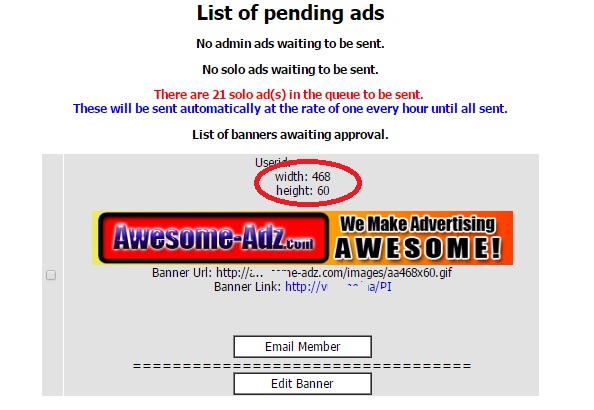
The major problem I have is with 600×300 Login Ads.  I have many serial abusers.  So, I installed some code that adds the width and height to the approval window.  That makes it  so much easier, but there are some sneaky graphic designers who put a small or non-existing graphic in Layer 0 (on a multi-layer or GIF Ad).  In that case it does not report the graphic dimensions.

The code I added was pretty simple.  The $variables are the result of the select statement and are pretty self explanatory.

<?
list($width, $height) = getimagesize($bannerurl);
echo “width: ” . $width . “<br />”;
echo “height: ” . $height;
?>

The workhorse in this code is getimagesize() which returns an array.

  • Element 0 is WIDTH
  • Element 1 is HEIGHT

There is so much more information about the graphic object, but these are the only two elements I care about here.

So, when I add this code, here’s what it looks like:

getimagesizeexample

I added several other reports:

  • View Login Ads By Userid – I prompt for the userid to select and display all Login ads submitted by that member.
  • View All Oversize Login Ads – I haven’t found a way to make this run any faster – with over 5000 login ads in my database, it takes awhile to determine the oversize ads and display them in an approval window.
  • Graphic Preview – I modified the Graphic Preview code to display the width and height.  At some point (when I figure out how to screen those Layer 0 ads that so not display the size), I will also put up blocker code that will keep them from submitting oversize ads.

I receive hundreds to thousands of ads per day, many of which originate from the blaster systems.  I have also put some additional reports that help me segregate the locally submitted ads from the blaster-originated ads.  Even though these ads are SUPPOSED to be approved at the originating site, I still get SO MANY that were just summarily approved just to clear the queue.

As always, please feel free to contact me with questions, if you want a demo, or are curious about other resources I can share with you.

My contact info:

Rich Moyer
WebcastSource .com
1-484-902-8819 m-f 8am-5pm EST
Email: richard.moyer.1953@gmail .com
I am a CONSULTANT FIRST and SALESMAN LAST.
Paying It Forward…
Listen to a recording about my MLM business
and how I get 3-5 leads per day.
Call 1-585-902-8819
(Callbacks to US only. Other countries leave email address)

Got Backup? Haven’t signed up for YOUR
Unlimited Cloud Storage? Get it NOW.
>>>>> http://www.WebcastSource.com/?rd=rg9jrZt9

Totally Oblivious About Requirements to Start a Home-Based Business

Requirements to Start a Home-Based Business

There was someone on the chat room that asked if she would start a home-based business, is it considered a “job” and does she have to pay taxes…

By the time I saw her message, she was gone. But I took the time to type this up, so here goes…

No it is not considered a job (meaning you will not get a W-2,) but when you start a home-based business, you are required to file taxes as a business, track your expenses, obtain the necessary business licensing and tax numbers. Another nicety of having a business in the US is that you must pay TWICE the Social Security. If you have not made over $600 you do not pay taxes on that, but you are required to file. If you are tracking your expenses as you should be, you should have some substantial QUALIFIED deductions. That means that those expenses reduce your TAXABLE INCOME.

People are under the mistaken impression that when they start a home-based business such as Internet Marketing, or any time you make money (like eBay, auctions, taking surveys for cash, member to member cash systems, etc), their home-based business is exempt from taxes since it is “On the Internet”.  Your home-based business is subject to the exact same rules that a brick and mortar business must consider.

I found that same naivete when I started out as a real estate investor. I was part of a very large real estate investor’s organization that would draw 1000 people a month to their meetings. We had many national speakers, and I would see many newbies who saw an infomercial and they were going to by a book or a DIY course and “make their fortunes” flipping real estate.

This is how I got my consulting practice started – informing these folks about the business requirements, how to build a business plan and Pro Forma statement. How to work with a banker, broker, or investors to obtain funding, tax guidelines, and basic business principles, regulations, and how to research these things so they did not end up in trouble.

I would rent out a country club banquet hall, charge them $11 for lunch, and I would conduct free seminars and workshops. Some of them became long-term clients. I also introduced them to my mortgage broker, who was able to work with investors once we developed the business plan so these folks could get the necessary funding to get their business started.

I recommend anyone who does not understand the requirements to start and operate a home-based business look up the Small Business Administration website, the IRS website (IRS.GOV), state government department of state for business filing and treasury department for state sales and use tax requirements, local municipality offices, zoning board, licensing bureau, and local tax administration. Also stop by at H&R Block of other seasonal tax filing organizations.

I have always say you should identify your team:

  • Accountant – the accountant will tell you the filing requirements, what you should be tracking.
  • Consultant – will tell you HOW to do what the accountant told you to do.  A small business consultant will guide you about creating your business organization, licensing, zoning, sales tax, business plan, Pro Forma, how to work with bankers or mortgage brokers.
  • Lawyer – contracts, real estate settlement, LLC formation.

When first starting out, get them under retainer. It is better to understand the requirements FIRST rather suffer the consequences later.

Rich Moyer​ – CEO and Principal Consultant (retired)
Spaho Consulting

TAE Admin Approval Queue Report

The TAE Admin Approval Queue Report shows a quick count of the number of each ad type awaiting approval.  “Blaster” solos are broken out to help me better manage the SENDSOLO queue.

 The Code to Enhance the TAE Admin Approval Queue Operations

Several areas of the APPROVEADS.PHP file must be modified.  First, the “reporting area” that appears at the top of the Approve Ads screen displays a count of solos in the send queue, that is, those that are approved but have not yet been sent.

WARNING: Before making modifications to any code, be sure you copy it and rename the copy so you can recognize it as the original.  If you make a mistake, simply deleting your changed file and renaming the original will restore it to a known working state.


The Reporting area

This is a simple replication of the code that is already there to approve solos, and then making some “where” clause delimiters that separate the “normal” solos from the solo ads that have “promotionmagnet” in the URL.  

The first query appends a condition to the where clause: and not url like ‘%promotionmagnet%’

 The second query appends a condition to the where clause: and  url like ‘%promotionmagnet%’

Other than some minor editing of labels that display on the screen with those counts.

// RJM changed this section to display only “normal” solo ads (ie. NOT Promotion Magnet) that have been approved and are in the send queue
$querysolos = “select * from solos where (sent=0 and added=1 and approved=1) and not url like ‘%promotionmagnet%'”;
$resultsolos = mysql_query ($querysolos)
or die (“Query failed”);
$numrowssolos = @ mysql_num_rows($resultsolos);
if ($numrowssolos == 0) {

echo “<p><center>No solo ads waiting to be sent.</center>”;

}
else {

?>
<p><font color=”red”><center>There are <? echo $numrowssolos; ?> Normal solo ad(s) in the queue to be sent. </font><br><font color=”blue”>These will be sent automatically at the rate of one every hour until all sent.</center></p></font>
<?

}
// RJM end of changed section

// RJM Added this section to separate the Promotional Magnet solos from “normal” solos that have been approved and are in the send queue

$querysolos = “select * from solos where (sent=0 and added=1 and approved=1) and url like ‘%promotionmagnet%'”;
$resultsolos = mysql_query ($querysolos)
or die (“Query failed”);
$numrowssolos = @ mysql_num_rows($resultsolos);
if ($numrowssolos == 0) {

echo “<p><center>No Promotion Magnet solo ads waiting to be sent.</center>”;

}
else {

?>
<p><font color=”red”><center>There are <? echo $numrowssolos; ?> Promotion Magnet solo ad(s) in the queue to be sent. </font><br><font color=”blue”>These will be sent automatically at the rate of one every hour until all sent.</center></p></font>
<?

}
// RJM end of new section


 The Approval Area

This is a bit more complex only because the sections of code are much longer.  You must be sure you include all of the code in each section.

 Using the Code Editor in CPANEL, I like to find an If… Else  section by clicking on the left bracket ( { ) immediately following the IF statement.  The CODE EDITOR will show you matched parentheses and brackets by highlighting then in orange.  Now look down through the code until you find the matching right bracket ( } ).  That should take you to the ELSE portion of that statement.  Use the same procedure to find the start and end brackets for the ELSE.  This should be the end of the code you need to replicate.  Simply start from the beginning of that code section to after that last right bracket, copy it to the clipboard, and paste it after the end of the  last section.

The first query appends a condition to the where clause: and not url like ‘%promotionmagnet%’

 The second query appends a condition to the where clause: and  url like ‘%promotionmagnet%’

There is some minor editing of labels that display on the screen with those ads to be removed for approval.

One other important thing: you must identify each code area with a different name to make the “inverse” button check the ads in that section only.  In the second section of code, I highlighted the changed document name.

// RJM changed to show only “normal” solo ads, excluding those from Promotion Magnet
$query3 = “select * from solos where approved=0 and added=1 and not url like ‘%promotionmagnet%’“;
$result3 = mysql_query ($query3)
or die (“Query failed”);
$numrows3 = @ mysql_num_rows($result3);
if ($numrows3 == 0) {
echo “<p><center>No Normal Solo ads awaiting approval.</center>”;
}
else {

echo “<p><center>List of Normal Solo ads awaiting approval.</p>”;
?>
<form action=”approvesolo.php” method=POST name=solo>
<table width=85% border=0 cellpadding=2 cellspacing=2>
<?
while ($line3 = mysql_fetch_array($result3)) {
$id = $line3[“id”];
$userid = $line3[“userid”];
$subject = $line3[“subject”];
$adbody = $line3[“adbody”];
$url = $line3[“url”];

?>
<tr>
<td bgcolor=”<? echo $basecolour; ?>”><input type=”checkbox” name=”id[]” value=”<? echo $id; ?>”></td> <td bgcolor=”<? echo $basecolour; ?>”><font size=2 face=”<? echo $fonttype; ?>” color=”<? echo $fontcolour; ?>”>
<center>Userid: <a href=”memberlogin.php?userid=<? echo $userid; ?>”><? echo $userid; ?></a></center>
<br>
<center>Date Submitted: <? echo date(“Y-m-d G:i”, $line3[“date”]); ?></font></center>
<br>
<center>Subject: <? echo $subject; ?></center>
<br>
<center><? echo $adbody; ?></center>
<br>
<center><a href=”sitecheck.php?url=<? echo $url; ?>” target=”_blank”><? echo $url; ?></a></font></center>
<br>
<center><table border=1 cellpadding=0 cellspacing=0 width=155 height=26><tr valign=middle><td align=”center” nowrap style=”background:white” onMouseDown=”this.style.backgroundColor=’#FFFFFF'” onMouseOver=”this.style.backgroundColor='<? echo $nav_hover; ?>'” onMouseOut=”this.style.backgroundColor=’#FFFFFF'”><a href=”email.php?Member=<? echo $userid; ?>” class=”button” target=”_blank” onmouseover=”window.status=’Email Member’;return true” onMouseOut=”window.status=”;return true”><font color=”#000000″>&nbsp;&nbsp;&nbsp;Email Member&nbsp;&nbsp;&nbsp;</font></a></td></tr></table></center>

<center>
<b>==================================<br>
<center><table border=1 cellpadding=0 cellspacing=0 width=155 height=26><tr valign=middle><td align=”center” nowrap style=”background:white” onMouseDown=”this.style.backgroundColor=’#FFFFFF'” onMouseOver=”this.style.backgroundColor='<? echo $nav_hover; ?>'” onMouseOut=”this.style.backgroundColor=’#FFFFFF'”><a href=”editsolo.php?id=<? echo $id; ?>” class=”button” target=”_blank” onmouseover=”window.status=’Edit Solo’;return true” onMouseOut=”window.status=”;return true”><font color=”#000000″>&nbsp;&nbsp;&nbsp;Edit Solo&nbsp;&nbsp;&nbsp;</font></a></td></tr></table></center>

</td>
<tr>
<td>&nbsp;</td>
</tr>

</tr> <?
}
echo ‘</table><input type=”button” onClick=”return Inverse(document.solo);” value=”Inverse”><input type=”submit” name=”submit” value=”Approve”><input type=”submit” name=”submit” value=”Delete”></form></center>’;

}

//RJM added this section to show Promotion Magnet Solo Ads only
$query3 = “select * from solos where approved=0 and added=1 and url like ‘%promotionmagnet%'”;
$result3 = mysql_query ($query3)
or die (“Query failed”);
$numrows3 = @ mysql_num_rows($result3);
if ($numrows3 == 0) {

echo “<p><center>No Promotion Magnet Solo ads awaiting approval.</center>”;
}
else {
echo “<p><center>List of Promotion Magnet Solo ads awaiting approval.</p>”;
?>
<form action=”approvesolo.php” method=POST name=pmsolo>
<table width=85% border=0 cellpadding=2 cellspacing=2>
<?
while ($line3 = mysql_fetch_array($result3)) {
$id = $line3[“id”];
$userid = $line3[“userid”];
$subject = $line3[“subject”];
$adbody = $line3[“adbody”];
$url = $line3[“url”];

?>
<tr>
<td bgcolor=”<? echo $basecolour; ?>”><input type=”checkbox” name=”id[]” value=”<? echo $id; ?>”></td> <td bgcolor=”<? echo $basecolour; ?>”><font size=2 face=”<? echo $fonttype; ?>” color=”<? echo $fontcolour; ?>”>
<center>Userid: <a href=”memberlogin.php?userid=<? echo $userid; ?>”><? echo $userid; ?></a></center>
<br>
<center>Date Submitted: <? echo date(“Y-m-d G:i”, $line3[“date”]); ?></font></center>
<br>
<center>Subject: <? echo $subject; ?></center>
<br>
<center><? echo $adbody; ?></center>
<br>
<center><a href=”sitecheck.php?url=<? echo $url; ?>” target=”_blank”><? echo $url; ?></a></font></center>
<br>
<center><table border=1 cellpadding=0 cellspacing=0 width=155 height=26><tr valign=middle><td align=”center” nowrap style=”background:white” onMouseDown=”this.style.backgroundColor=’#FFFFFF'” onMouseOver=”this.style.backgroundColor='<? echo $nav_hover; ?>'” onMouseOut=”this.style.backgroundColor=’#FFFFFF'”><a href=”email.php?Member=<? echo $userid; ?>” class=”button” target=”_blank” onmouseover=”window.status=’Email Member’;return true” onMouseOut=”window.status=”;return true”><font color=”#000000″>&nbsp;&nbsp;&nbsp;Email Member&nbsp;&nbsp;&nbsp;</font></a></td></tr></table></center>

<center>
<b>==================================<br>
<center><table border=1 cellpadding=0 cellspacing=0 width=155 height=26><tr valign=middle><td align=”center” nowrap style=”background:white” onMouseDown=”this.style.backgroundColor=’#FFFFFF'” onMouseOver=”this.style.backgroundColor='<? echo $nav_hover; ?>'” onMouseOut=”this.style.backgroundColor=’#FFFFFF'”><a href=”editsolo.php?id=<? echo $id; ?>” class=”button” target=”_blank” onmouseover=”window.status=’Edit Solo’;return true” onMouseOut=”window.status=”;return true”><font color=”#000000″>&nbsp;&nbsp;&nbsp;Edit Solo&nbsp;&nbsp;&nbsp;</font></a></td></tr></table></center>

</td>
<tr>
<td>&nbsp;</td>
</tr>

</tr> <?
}
echo ‘</table><input type=”button” onClick=”return Inverse(document.pmsolo);” value=”Inverse”><input type=”submit” name=”submit” value=”Approve”><input type=”submit” name=”submit” value=”Delete”></form></center>’;

}


Don’t forget to save the file, and TEST, TEST, TEST.

These few minor changes to the script help me better manage the monster influx of blaster adds, and allow me to give priority to ads submitted by local members, in addition to tons of time that it took to manually review that queue 10-15 times per day to be sure MY subscribers were getting the best service.


Rich Moyer

aka the ExcelVBA Wizard

WebcastSource.com

MyAdvertisingPays – Make Money Now

I found an “advertising platform”, with a $500 investment, I am making $10 per day.  That’s right – $3600 per year for a $500 investment.

The program is MAPS – MyAdvertisingPays.

Here is a quick 10 minute video tour.


How I Got Started

It was unbelievably simple:

  • I Signed up HERE, and upgraded for $24.99 per year to BASIC level
  • I invested in a few “Credit Packs”
  • I set up my text ads (I have several)
  • I click 10 ads per day – You must do this to qualify for revenue sharing (the income piece)
  • I apply my credits from surfing ad to my ads
  • I set it up to purchase more credit packs whenever I have enough in earnings to purchase a new credit pack
  • For every credit pack purchased, I applied the credits to my ads

I chose to purchase 1 credit pack initially, but when I saw that the one credit pack was making earnings, I purchased 10 more, so my total out of pocket expense for credit packs and membership was $578

CAUTION – UNDER NO CIRCUMSTANCES SHOULD YOU EMPTY OUT YOUR 401K OR COLLEGE FUND TO INVEST HERE!

Other Unexpected Benefits

Not only a great income program,  but look at the effectiveness of advertising. CTR’s from 5.88% to 9.09%  Not so shabby

 
Impressions/Clicks CTR
22/229

6/262

21/13

380/28

1022/85

1883/148

      9.09%

8.78%

5.88%

7.37%

8.32%

7.86%


Tools

There is a free MAPS calculator you can download.  Not bad – allows you to project your income. While it is not an official tool, and is wrapped in a ton of disclaimers, you can get an idea of how this might benefit you.

Program Add-Ons

Unfortunately, when I signed up, I got sucked into also subscribing to Power Lead System for $30 per month. While the custom pages created are nice, I have tons of squeeze page programs and do not need another.  But, for a program where you can sign up for free to get started and make $10 per day residual income, I figured I will hang on to it.

Referrals substantially help your income because you get commission of all the credit packs and paid advertising they buy.  Research has proven that leads from Pennies for Profits are very responsive and are showing great CTR’s when those leads are exposed to MAPS and also XLN/4Corners.  P4P is $30 per month, and you get 100 Network Marketing/MLM targeted leads per DAY.  You can download your leads and load them into an autoresponder if you take the risk of them not doing a second opt-in.  I just mail them using the built-in mailer every couple days.


Rich Moyer