Category Archives: TAE Software and Tools

The Paypal Wars

I wanted to let all of my subscribers know that, while Paypal has not given me notice, I expect it is inevitable that Paypal will drop my account.  I had taken preemptive moves to ensure business continuity.

 
All of my businesses are either converted to alternative payment processors or are in progress.  I intend to use the following methods to accept payments and pay commissions:

  • Payza – for purchases and commissions
  • Solid Trust Pay (STP) for commissions only
  • BitCoin/CoinBase – for payments and commissions
  • my own merchant account to accept credit and debit cards – payments only


Payza

 
While I am still feeling the sting of the losses I experienced at Payza’s last temper tantrum, Payza is in place for most of my sites right now.  Most on-site purchases can be made using Payza payment buttons now.


Payza charges exhorbitant fees compared to Paypal, and they do not play nice with credit card companies and US banks. The only way I can transfer money in or out of Payza is using Bitcoin/Coinbase – all the credit card and bank transactions to load my ewallet fail, and Payza is just deflecting by fingerpointing. 

Be sure you join Payza, add your credit card or bank account, then get the necessary verifications as soon as possible.  You will have to transfer money into your eWallet or use authorized credit cards.

Solid Trust Pay 

STP also charges fees for everything.  Like Payza, you must transfer money using an eWallet.  There are no payment buttons available so STP will be used as a last resort to do person-to-person transfers only.

Bitcoin/CoinBase

Coinbase is the eWallet that front-ends BitCoin.  Verifications are required to transfer money in or out of the CoinBase eWallets.  Once it is set up, it works very nicely.  I am developing an On-site solution using CoinBase Payment Buttons for Commissions Unleashed.  It will implemented first on CU as a proof of concept, then expanding to the rest of my sites.  Site owners are interested in my implementation, and would expect this same solution to appear on many of your favorite sites. 

So, that is the current status.  I will keep you informed of progress. 

Rich Moyer
Giant Profit Ads
Mad Cow Ads
WebcastSource
Commissions Unleashed
Your Lucky Fast Cash
Freedom Mails
OneStopSolos
GrabThoseLeads 
 

How to Keep Focus on Ads – After No Thanks Links

Every TAE site that uses OTOs or Login offers,  you have a link at the bottom of the page for “No Thanks – take me to Member Area”

I make it harder to find that link, while getting exposure to ads (banner rotators, etc).

Many programs have “code” to display their badge or rotators.  Get the HTML code from their website promotional tools.

Put the rotator code in the SITE FOOTER.

That way when they hit END to move them to the bottom of the page to find that “No Thanks” link, they will unconsciously look at those ads while searching for the link.  


In a week, I got 2,002 credits from City Pennysaver for putting their banner rotator code on my sites.  


Do YOU want YOUR banners and links there too on MY SITES?  

Want to LEARN how to do this yourself?   ASK!

Rich Moyer
1-484-902-8819 m-f 8am-5pm EST
Email: richard.moyer.1953@gmail .com
I am a CONSULTANT FIRST and FOREMOST.
Paying It Forward…


Battle of Graphic Ad Sizes – The Clueless and The Abusers

Graphic Ad Sizes

One of the constant battles I fight on a daily basis as an admin for my TAE’s (also called Safelists, Traffic Ad Exchanges) is the Battle of Graphic Ad Sizes – The Clueless and The Abusers.   The problem is that oversized ads actually fail the framebreaker test, and they in fact do cause distortion of the whole presentation area, they encroach on input forms, and just create havoc.

Most normal safelist users are clueless.  They don’t know the difference between a Banner ad (468×60), a Button Ad (125×125) and a Login Ad (600×300).  They simply use what the admins of their affiliate program supply for them.  In many cases, I attempt to contact the member, and ask them to contact the program admin to post the correct size ads.  Honestly, it is a waste of time and effort in most cases.  Even the admins do not know that these three ad sizes are the only accepted graphic ads in 95% of TAE’s and Banner Exchanges.

There is an easy way to test the ad size: if using Chrome or Firefox, simply right click the graphic, and Open in a New Tab – the size will be at the end of the tab tag in parenthesis.

The Abusers are those people who knowingly submit TONS of ads with full knowledge that they are the wrong ad size.  If I find one login ad that is the wrong size, it’s a good bet that many others are being submitted, for multiple programs.   Since I connected my TAE’s to several “Blaster” sites, I get bombarded with oversize ads.  AND, the same people are purposely submitting UNDER SIZED ADS to get attention.   OK, in this case, even though they are breaking  the rules and in violation of the TOS, they are not breaking frames, so I let them pass.

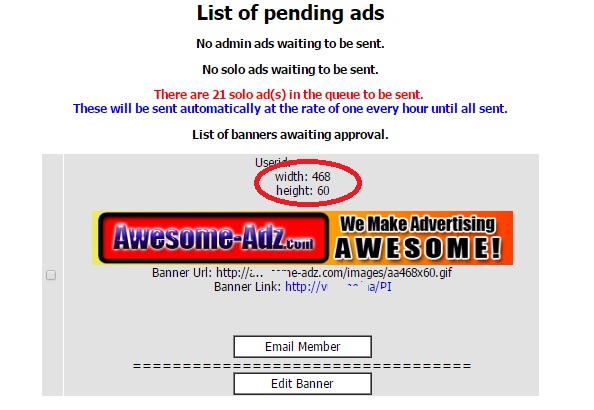
The major problem I have is with 600×300 Login Ads.  I have many serial abusers.  So, I installed some code that adds the width and height to the approval window.  That makes it  so much easier, but there are some sneaky graphic designers who put a small or non-existing graphic in Layer 0 (on a multi-layer or GIF Ad).  In that case it does not report the graphic dimensions.

The code I added was pretty simple.  The $variables are the result of the select statement and are pretty self explanatory.

<?
list($width, $height) = getimagesize($bannerurl);
echo “width: ” . $width . “<br />”;
echo “height: ” . $height;
?>

The workhorse in this code is getimagesize() which returns an array.

  • Element 0 is WIDTH
  • Element 1 is HEIGHT

There is so much more information about the graphic object, but these are the only two elements I care about here.

So, when I add this code, here’s what it looks like:

getimagesizeexample

I added several other reports:

  • View Login Ads By Userid – I prompt for the userid to select and display all Login ads submitted by that member.
  • View All Oversize Login Ads – I haven’t found a way to make this run any faster – with over 5000 login ads in my database, it takes awhile to determine the oversize ads and display them in an approval window.
  • Graphic Preview – I modified the Graphic Preview code to display the width and height.  At some point (when I figure out how to screen those Layer 0 ads that so not display the size), I will also put up blocker code that will keep them from submitting oversize ads.

I receive hundreds to thousands of ads per day, many of which originate from the blaster systems.  I have also put some additional reports that help me segregate the locally submitted ads from the blaster-originated ads.  Even though these ads are SUPPOSED to be approved at the originating site, I still get SO MANY that were just summarily approved just to clear the queue.

As always, please feel free to contact me with questions, if you want a demo, or are curious about other resources I can share with you.

My contact info:

Rich Moyer
WebcastSource .com
1-484-902-8819 m-f 8am-5pm EST
Email: richard.moyer.1953@gmail .com
I am a CONSULTANT FIRST and SALESMAN LAST.
Paying It Forward…
Listen to a recording about my MLM business
and how I get 3-5 leads per day.
Call 1-585-902-8819
(Callbacks to US only. Other countries leave email address)

Got Backup? Haven’t signed up for YOUR
Unlimited Cloud Storage? Get it NOW.
>>>>> http://www.WebcastSource.com/?rd=rg9jrZt9

TAE Admin Approval Queue Report

The TAE Admin Approval Queue Report shows a quick count of the number of each ad type awaiting approval.  “Blaster” solos are broken out to help me better manage the SENDSOLO queue.

 The Code to Enhance the TAE Admin Approval Queue Operations

Several areas of the APPROVEADS.PHP file must be modified.  First, the “reporting area” that appears at the top of the Approve Ads screen displays a count of solos in the send queue, that is, those that are approved but have not yet been sent.

WARNING: Before making modifications to any code, be sure you copy it and rename the copy so you can recognize it as the original.  If you make a mistake, simply deleting your changed file and renaming the original will restore it to a known working state.


The Reporting area

This is a simple replication of the code that is already there to approve solos, and then making some “where” clause delimiters that separate the “normal” solos from the solo ads that have “promotionmagnet” in the URL.  

The first query appends a condition to the where clause: and not url like ‘%promotionmagnet%’

 The second query appends a condition to the where clause: and  url like ‘%promotionmagnet%’

Other than some minor editing of labels that display on the screen with those counts.

// RJM changed this section to display only “normal” solo ads (ie. NOT Promotion Magnet) that have been approved and are in the send queue
$querysolos = “select * from solos where (sent=0 and added=1 and approved=1) and not url like ‘%promotionmagnet%'”;
$resultsolos = mysql_query ($querysolos)
or die (“Query failed”);
$numrowssolos = @ mysql_num_rows($resultsolos);
if ($numrowssolos == 0) {

echo “<p><center>No solo ads waiting to be sent.</center>”;

}
else {

?>
<p><font color=”red”><center>There are <? echo $numrowssolos; ?> Normal solo ad(s) in the queue to be sent. </font><br><font color=”blue”>These will be sent automatically at the rate of one every hour until all sent.</center></p></font>
<?

}
// RJM end of changed section

// RJM Added this section to separate the Promotional Magnet solos from “normal” solos that have been approved and are in the send queue

$querysolos = “select * from solos where (sent=0 and added=1 and approved=1) and url like ‘%promotionmagnet%'”;
$resultsolos = mysql_query ($querysolos)
or die (“Query failed”);
$numrowssolos = @ mysql_num_rows($resultsolos);
if ($numrowssolos == 0) {

echo “<p><center>No Promotion Magnet solo ads waiting to be sent.</center>”;

}
else {

?>
<p><font color=”red”><center>There are <? echo $numrowssolos; ?> Promotion Magnet solo ad(s) in the queue to be sent. </font><br><font color=”blue”>These will be sent automatically at the rate of one every hour until all sent.</center></p></font>
<?

}
// RJM end of new section


 The Approval Area

This is a bit more complex only because the sections of code are much longer.  You must be sure you include all of the code in each section.

 Using the Code Editor in CPANEL, I like to find an If… Else  section by clicking on the left bracket ( { ) immediately following the IF statement.  The CODE EDITOR will show you matched parentheses and brackets by highlighting then in orange.  Now look down through the code until you find the matching right bracket ( } ).  That should take you to the ELSE portion of that statement.  Use the same procedure to find the start and end brackets for the ELSE.  This should be the end of the code you need to replicate.  Simply start from the beginning of that code section to after that last right bracket, copy it to the clipboard, and paste it after the end of the  last section.

The first query appends a condition to the where clause: and not url like ‘%promotionmagnet%’

 The second query appends a condition to the where clause: and  url like ‘%promotionmagnet%’

There is some minor editing of labels that display on the screen with those ads to be removed for approval.

One other important thing: you must identify each code area with a different name to make the “inverse” button check the ads in that section only.  In the second section of code, I highlighted the changed document name.

// RJM changed to show only “normal” solo ads, excluding those from Promotion Magnet
$query3 = “select * from solos where approved=0 and added=1 and not url like ‘%promotionmagnet%’“;
$result3 = mysql_query ($query3)
or die (“Query failed”);
$numrows3 = @ mysql_num_rows($result3);
if ($numrows3 == 0) {
echo “<p><center>No Normal Solo ads awaiting approval.</center>”;
}
else {

echo “<p><center>List of Normal Solo ads awaiting approval.</p>”;
?>
<form action=”approvesolo.php” method=POST name=solo>
<table width=85% border=0 cellpadding=2 cellspacing=2>
<?
while ($line3 = mysql_fetch_array($result3)) {
$id = $line3[“id”];
$userid = $line3[“userid”];
$subject = $line3[“subject”];
$adbody = $line3[“adbody”];
$url = $line3[“url”];

?>
<tr>
<td bgcolor=”<? echo $basecolour; ?>”><input type=”checkbox” name=”id[]” value=”<? echo $id; ?>”></td> <td bgcolor=”<? echo $basecolour; ?>”><font size=2 face=”<? echo $fonttype; ?>” color=”<? echo $fontcolour; ?>”>
<center>Userid: <a href=”memberlogin.php?userid=<? echo $userid; ?>”><? echo $userid; ?></a></center>
<br>
<center>Date Submitted: <? echo date(“Y-m-d G:i”, $line3[“date”]); ?></font></center>
<br>
<center>Subject: <? echo $subject; ?></center>
<br>
<center><? echo $adbody; ?></center>
<br>
<center><a href=”sitecheck.php?url=<? echo $url; ?>” target=”_blank”><? echo $url; ?></a></font></center>
<br>
<center><table border=1 cellpadding=0 cellspacing=0 width=155 height=26><tr valign=middle><td align=”center” nowrap style=”background:white” onMouseDown=”this.style.backgroundColor=’#FFFFFF'” onMouseOver=”this.style.backgroundColor='<? echo $nav_hover; ?>'” onMouseOut=”this.style.backgroundColor=’#FFFFFF'”><a href=”email.php?Member=<? echo $userid; ?>” class=”button” target=”_blank” onmouseover=”window.status=’Email Member’;return true” onMouseOut=”window.status=”;return true”><font color=”#000000″>&nbsp;&nbsp;&nbsp;Email Member&nbsp;&nbsp;&nbsp;</font></a></td></tr></table></center>

<center>
<b>==================================<br>
<center><table border=1 cellpadding=0 cellspacing=0 width=155 height=26><tr valign=middle><td align=”center” nowrap style=”background:white” onMouseDown=”this.style.backgroundColor=’#FFFFFF'” onMouseOver=”this.style.backgroundColor='<? echo $nav_hover; ?>'” onMouseOut=”this.style.backgroundColor=’#FFFFFF'”><a href=”editsolo.php?id=<? echo $id; ?>” class=”button” target=”_blank” onmouseover=”window.status=’Edit Solo’;return true” onMouseOut=”window.status=”;return true”><font color=”#000000″>&nbsp;&nbsp;&nbsp;Edit Solo&nbsp;&nbsp;&nbsp;</font></a></td></tr></table></center>

</td>
<tr>
<td>&nbsp;</td>
</tr>

</tr> <?
}
echo ‘</table><input type=”button” onClick=”return Inverse(document.solo);” value=”Inverse”><input type=”submit” name=”submit” value=”Approve”><input type=”submit” name=”submit” value=”Delete”></form></center>’;

}

//RJM added this section to show Promotion Magnet Solo Ads only
$query3 = “select * from solos where approved=0 and added=1 and url like ‘%promotionmagnet%'”;
$result3 = mysql_query ($query3)
or die (“Query failed”);
$numrows3 = @ mysql_num_rows($result3);
if ($numrows3 == 0) {

echo “<p><center>No Promotion Magnet Solo ads awaiting approval.</center>”;
}
else {
echo “<p><center>List of Promotion Magnet Solo ads awaiting approval.</p>”;
?>
<form action=”approvesolo.php” method=POST name=pmsolo>
<table width=85% border=0 cellpadding=2 cellspacing=2>
<?
while ($line3 = mysql_fetch_array($result3)) {
$id = $line3[“id”];
$userid = $line3[“userid”];
$subject = $line3[“subject”];
$adbody = $line3[“adbody”];
$url = $line3[“url”];

?>
<tr>
<td bgcolor=”<? echo $basecolour; ?>”><input type=”checkbox” name=”id[]” value=”<? echo $id; ?>”></td> <td bgcolor=”<? echo $basecolour; ?>”><font size=2 face=”<? echo $fonttype; ?>” color=”<? echo $fontcolour; ?>”>
<center>Userid: <a href=”memberlogin.php?userid=<? echo $userid; ?>”><? echo $userid; ?></a></center>
<br>
<center>Date Submitted: <? echo date(“Y-m-d G:i”, $line3[“date”]); ?></font></center>
<br>
<center>Subject: <? echo $subject; ?></center>
<br>
<center><? echo $adbody; ?></center>
<br>
<center><a href=”sitecheck.php?url=<? echo $url; ?>” target=”_blank”><? echo $url; ?></a></font></center>
<br>
<center><table border=1 cellpadding=0 cellspacing=0 width=155 height=26><tr valign=middle><td align=”center” nowrap style=”background:white” onMouseDown=”this.style.backgroundColor=’#FFFFFF'” onMouseOver=”this.style.backgroundColor='<? echo $nav_hover; ?>'” onMouseOut=”this.style.backgroundColor=’#FFFFFF'”><a href=”email.php?Member=<? echo $userid; ?>” class=”button” target=”_blank” onmouseover=”window.status=’Email Member’;return true” onMouseOut=”window.status=”;return true”><font color=”#000000″>&nbsp;&nbsp;&nbsp;Email Member&nbsp;&nbsp;&nbsp;</font></a></td></tr></table></center>

<center>
<b>==================================<br>
<center><table border=1 cellpadding=0 cellspacing=0 width=155 height=26><tr valign=middle><td align=”center” nowrap style=”background:white” onMouseDown=”this.style.backgroundColor=’#FFFFFF'” onMouseOver=”this.style.backgroundColor='<? echo $nav_hover; ?>'” onMouseOut=”this.style.backgroundColor=’#FFFFFF'”><a href=”editsolo.php?id=<? echo $id; ?>” class=”button” target=”_blank” onmouseover=”window.status=’Edit Solo’;return true” onMouseOut=”window.status=”;return true”><font color=”#000000″>&nbsp;&nbsp;&nbsp;Edit Solo&nbsp;&nbsp;&nbsp;</font></a></td></tr></table></center>

</td>
<tr>
<td>&nbsp;</td>
</tr>

</tr> <?
}
echo ‘</table><input type=”button” onClick=”return Inverse(document.pmsolo);” value=”Inverse”><input type=”submit” name=”submit” value=”Approve”><input type=”submit” name=”submit” value=”Delete”></form></center>’;

}


Don’t forget to save the file, and TEST, TEST, TEST.

These few minor changes to the script help me better manage the monster influx of blaster adds, and allow me to give priority to ads submitted by local members, in addition to tons of time that it took to manually review that queue 10-15 times per day to be sure MY subscribers were getting the best service.


Rich Moyer

aka the ExcelVBA Wizard

WebcastSource.com

Tutorial: Promotion Magnet Awaiting Approval Report

I own several relatively small safelists: Giant Profit Ads and Mad Cow Ads.   Both of these are on the same server, so they share MYSQL engine, and cron.  When I signed up as a partner with several solo blaster networks, I found that my server seemed to be crawling.  It was taking forever to clear the SOLO Ad queues and in fact, it got totally out of control. I created the Promotion Magnet Awaiting Approval Report to help me manage my queue and give priority to Mad Cow Ads and Giant Profit Ads members in sending Solo ads.

The good folks at AFF looked into the problem, and identified that it was in fact the blaster programs that were feeding traffic in faster than the queue could send them out.  The way the Solo Send Queue works, is there is a command sendsolos.php placed in Linux scheduler called process “cron”, a system task that runs all the time in every Linux machine, and is used to execute a particular command either at a specific time or at a prescribed interval.   The items to be schedule are put into a “cron table” or “crontab” which is read by the cron process.   You can access cron for your server from CPANEL.  Only those items running in your partition of the Linux machine can be seen by you.

A temporary fix to this solo ad send queue backup was to change the crontab for sendsolos.php spedifying a shorter time interval and then monitor the server closely.   While this helped clear the logjam, it still took several days since the solo queue was well over 100.

The Fix

There were several things that we did that gave me more control.  For instance, the blaster programs (Promotion Magnet and Real Time Ad Blaster) both had options to either auto-approve, or manually approve.  The initial configuration was to have those blaster ad systems automatically approve the posts.  My thought was, they had to be approved by the admin on the system from which they originated, so then, when they were sent to my server, I would should not have to approve them again.   Again, my thought was, “why approve it twice?”

Manual Approve is Your Friend

By switching the blaster configurations to manual approval, it put control back in my hands for the ads originating from the blaster systems that were being added to the solo send queue.   It also created a heck of a lot of work for me to monitor and manually approve ads to maintain a reasonable queue depth so we don’t get emails rejected.

My New Approval Process

Promotion Magnet and Real Time Ad Blast systems are now set to manual approval.

I am getting tons of banners,  buttons, hot links, traffic links, and login ads, which takes some time to validate the image and/or text, validate the target URL, run framebreaker tests, and approve.  It is hard to distinguish which of these are coming from my own system or from the partner feeds, so I do go through with the manual approval process as stated above.

Solo ads are a different story.  When an blaster solo ad is sent from the blaster system, for tracking purposes, the target URL on the solo ad is cloaked with the root blaster system URL, which is fairly obvious to visually detect in the target URL field shown for solo ad approval.

I approve all locally generated solo ads first after running framebreaker.  Unless it is a massive rush, they get approved into the send queue right away.   In “Approve Ads” on the admin Nav menu, a number is displayed on that screen consisting of the count of approved ads in queue, waiting to send.  If that number is below 10, I then manually approve the blaster solo ads awaiting my approval until a send queue number not exceeding 10 is reached.

Good Night Gracey

I am a one-man shop, so I do have to sleep some amount of time.  Before I am getting ready to shut down my laptop for the night, I approve up to 50 blaster solo ads to fill the queue until I come back on admin duty.

This has worked out very nicely so far.  My Solo ads originating from members on my own systems are being given priority, the queues are not overloaded, and the crontab entries for sendsolos.php are back to the “normal” setting of once every hour, and there is no detrimental effects I have found.

What is missing?

I found that it would be helpful to know how many blaster solo ads are awaiting approval.  There was no report or facility in the software to accommodate this query.  Being familiar with the database structure and tables in the MySQL database, I was also comfortable enough to do some non-invasive queries using phpMyAdmin (available on CPANEL).  Once I formulated the SQL query, it was simple enough to create a php script that displays the date/time, system being queried, and count of solo ads from that blaster system awaiting approval.   The php script is run from the address bar in my  browser.  This is not fancy, and simply clears the screen to display this little report.  I call it the Promotion Magnet Awaiting Approval Report.

Multiple Systems in the Same Script

Because I have two safelists on the same server that share an MySQL database instance, it was easy to create the query code to allow multiple iterations of the report for each unique safelist.   I simply create a function in the PHP script that is called multiple times  from the mainline of the program, each call with the specific parameters required by each system database.

The Program: promotionmagnet-solos-in-queue.php

[code language=”php”]

<?php

// Copyright (c) 2015 Spaho Consulting

// Promotion Magnet Awaiting Approval Report
// Display the solo queue count for promotionmagnet
// for System1 and System2

//===========================================================
//Mainline Routine
//===========================================================

// Constants – change for each site
$ROOTUSERID = “your-root-userid”;
$ROOTPSWD = “your-root-password”;

// System1
$DBNAME = “system1db”;
$SAFELIST = “system1name “;
SoloQueueReport($DBNAME, $SAFELIST, $ROOTUSERID, $ROOTPSWD); // execute the report

// then System2
$DBNAME = “system2db”;
$SAFELIST = “system2name “;
SoloQueueReport($DBNAME, $SAFELIST, $ROOTUSERID, $ROOTPSWD); // execute the report

// end of mailine
//=============================================================

function SoloQueueReport($DBNAME, $SAFELIST, $ROOTUSERID, $ROOTPSWD)

{

// setup the log
$logfilename = “promotionmagnet-queue-count.log”;  //must exist before executing this report

// send output to log file
$handle = fopen (“$logfilename” , ‘a+’);
$date = new DateTime();
echo $SAFELIST . $date->format(‘Y-m-d H:i:s’) .”<br>”;
fwrite ($handle, $SAFELIST . ” ” . $date->format(‘Y-m-d H:i:s’) . “\n”);

// set up the database connection
$MYSQLI = new mysqli(“localhost”, “$ROOTUSERID”, “$ROOTPSWD”, “$DBNAME”,”3306″);

if ($MYSQLI->connect_errno) {
echo “Failed to connect to MySQL: ” . $MYSQLI->connect_errno . $MYSQLI->connect_error . “<br>”;
fwrite ($handle, “Failed to connect to MySQL: ” . $MYSQLI->connect_errno . $MYSQLI->connect_error . “\n”);
}
$result = null;

// see if there are any solos in queue
if ($result = $MYSQLI->query(“SELECT subject FROM solos where approved=0 and sent=0 and url like \”%promotionmagnet%\””))
{
printf(“Approval Queue = %d <br><br>”, $result->num_rows);
fwrite ($handle, “Approval Queue = ” . $result->num_rows . “\n\n”);
$result->close();
} else {
echo “No Promotion Magnet Solos in Queue <br><br>”;
fwrite ($handle, “No Promotion Magnet Solos in Queue \n\n”);
}
$MYSQLI->close();
fclose($handle);
}
?>

[/code]


Explanation of the Code

Mainline Code

This is the main program, Promotion Magnet Awaiting Approval Report, that sets up the parameters for querying the database for each system then calls the function  SoloQueueReport().

Constants

[code language=”php”]

// Constants – change for each site
$ROOTUSERID = “your-root-userid”;
$ROOTPSWD = “your-root-password”;

[/code]

Since both systems are co-located in separate subdomains of the same server, they share a common MYSQL database engine, but each have their own database that MYSQL installation.  Both would use the same Root UserID and Root Password to access those databases.


Set Up the Parameters

Each system has a separate database containing all of the tables needed to run that system.  We need to tell the database name through the variable $DBNAME, and the name of the system, which is used only in reporting but does not effect access to the database.

Once the Constants are set up, and the Unique Parameters are defined, we simply call the function, passing the variables containing those parameters to that function.

[code language=”php”]

// System1
$DBNAME = “system1db”;
$SAFELIST = “system1name “;
SoloQueueReport($DBNAME, $SAFELIST, $ROOTUSERID, $ROOTPSWD); // execute the report

[/code]

Inside the Function SoloQueueReport()

Set Up the Log File

[code language=”php”]

// setup the log
$logfilename = “promotionmagnet-queue-count.log”;

// send output to log file
$handle = fopen (“$logfilename” , ‘a+’);
$date = new DateTime();
echo $SAFELIST . $date->format(‘Y-m-d H:i:s’) .”<br>”;
fwrite ($handle, $SAFELIST . ” ” . $date->format(‘Y-m-d H:i:s’) . “\n”);

[/code]

This section defines the logfile name, then opens the file in APPEND mode

The  echo  writes the date to the screen, while the fwrite writes the date to the file.

Connect to the Database

[code language=”php”]

// set up the database connection
$MYSQLI = new mysqli(“localhost”, “$ROOTUSERID”, “$ROOTPSWD”, “$DBNAME”,”3306″);

if ($MYSQLI->connect_errno) {
echo “Failed to connect to MySQL: ” . $MYSQLI->connect_errno . $MYSQLI->connect_error . “<br>”;
fwrite ($handle, “Failed to connect to MySQL: ” . $MYSQLI->connect_errno . $MYSQLI->connect_error . “\n”);
}
$result = null;

[/code]

In order to do anything with a database, you must create a logical connection from the process to that database.  This also detects a failure and ends the procedure.

Build the SQL Query and Retrieve the Data

We are using a SELECT statement for the query.  The syntax is SELECT field FROM tablename WHERE field1 (comparative operator) value…

We are combining functions here: executing the query and performing an If Then Else test to ensure the result was returned.  If successful, then extract the number of rows returned by the query, and print the report both to the screen and the logfile.

If the query was not successful, or if the result was negative because there were no records retrieved that matched our criteria, then write an error message to both the screen and logfile.

[code language=”php”]

// see if there are any solos in queue
if ($result = $MYSQLI->query(“SELECT subject FROM solos where approved=0 and sent=0 and url like \”%promotionmagnet%\””))
{
printf(“Approval Queue = %d <br><br>”, $result->num_rows);
fwrite ($handle, “Approval Queue = ” . $result->num_rows . “\n\n”);
$result->close();
} else {
echo “No Promotion Magnet Solos in Queue <br><br>”;
fwrite ($handle, “No Promotion Magnet Solos in Queue \n\n”);
}

[/code]

The Finished Report

So that is it.  Here is what is shown on the screen.

[code language=”text”]

MadCowAds 2015-01-28 22:44:19
Approval Queue = 1

GiantProfitAds 2015-01-28 22:44:19
Approval Queue = 33

[/code]

Please feel free to create your own version of Promotion Magnet Awaiting Approval Report.  Be sure to adjust the database parameters and ensure your SQL table names are correct.

Rich Moyer AKA The Excel VBA Wizard is Principal Consultant (retired) of Spaho Consulting who brings you Life Balance Network , GiantProfitAds, Mad-Cow-Ads, Global Connections Ads, Empire Text Ads, and is a Senior Monitor for the WorldProfit Live Business Center and Platinum VIP member of WorldProfit, WebcastSource.com
Software Installation Instructions for Daily Login Bonus

Here are the software instructionsI promote the Daily Super Bonus AND the Daily Login Bonus (this software).

There are two components:
1) Edit your Member Home page to insert the daily code generation script when they click the button, and

2) The PHP file goes in your sitename.info/public_html/admin folder.  You must customize this PHP file with your SQL login, password, and IP address.  An entry is placed in cron to run after midnight local time (or the timezone of your target audience i.e. Australia.)


Append Your Own Ads to the Bottom of Every SOLO Ad Sent

You must edit the admin/sendsolo.php script.

You insert similar code after the main message so every time a SOLO ad from any user goes out, it has YOUR ad information at the bottom of that message before the SPAM warning.


//rjm  added my own ads to the end of message
$Message .= “————————————————————–<br><br>”;
$Message .= “Buyer Leads, No Tire Kickers.  Every Member is a PAID MEMBER.<br><br>”;
$URLSTRING = ‘<a href=”http://www.WebcastSource.com/?rd=be6kpwJL” target=”_blank” >Sign Up Today for Direct Pay Lead System</a><br><br>’;
$Message .= $URLSTRING;
$Message .= “————————————————————–<br><br>”;
$Message .= “What If I Told You That a One Time $18 Payment (Yes, like 3 Starbucks)<br><br>”;
$Message .= ” Plus 4 Referrals Could Change Your Life?  4 Corners Alliance.<br><br>”;
$URLSTRING = ‘<a href=”http://WebcastSource.com/itsonlyeighteenbucks” target=”_blank” >Join My Team NOW. I Can Help You Get Referrals.</a><br><br>’;
$Message .= $URLSTRING;
$Message .= “————————————————————–<br><br>”;
$Message .= “10,000 Best Selling Infomation Products From ClickBank.<br><br>”;
$Message .= “All Topics (Not Only Marketing) From One Digital Storefront<br><br>”;
$URLSTRING = ‘<a href=”http://www.WebcastSource.com/?rd=bq0qkVQG” target=”_blank” >Get Great Holiday Gifts</a><br><br>’;
$Message .= $URLSTRING;
$Message .= “————————————————————–<br><br>”;
$Message .=”You CAN Afford a Vacation. Fun Time Travel Club 4-in-One Discount Card.<br><br>”;
$Message .= “Save Hundreds for Every Hotel, Condo, or Cruise Vacation.<br><br>”;

    $URLSTRING = ‘<a href=”http://webcastsource.com/fttc” target=”_blank” >Get 50% Off First Year Membership til 12/31/2014</a><br><br>’;
$Message .= $URLSTRING;
// end of RJM ads

SQL Query to Show the Count for Queued ‘promotionmagnet’ Solos

This is a SQL query to determine how many Promotion Magnet Solos are in queue to send.  This can be adapted to anything, just look at your data to determine how to build the query.
  • You must have CPANEL access to your hosting server.  
  • You must have access to your MySQL database using phpMyAdmin.  
  • ]Select the database
  • Select the table “solos”
  • Copy/paste the SQL below into the SQL Query window and lick GO
SELECT distinct count(approved) FROM `solos` where (approved=’1′ and sent = ‘0’) and url like ‘%promotionmagnet%’;
group by approved

Explanation

  • SELECT FROM SOLOS – tells the SQL engine to use the SOLOS table in the current database
  • distinct count(approved)  – this limits your answer to one record, which contains the count of the number of records
  • where (approved=’1′ and sent = ‘0’) – this sets up the query to include only those records that have been approved AND not sent
  • and url like ‘%promotionmagnet%’ – also be sure the URL field of the record CONTAINS the partial string promotionmagnet
  • group by approved – this tells the SQL engine that some operation being executed that uses calculations on the approved field
  • ; – all SQL queries end in a semicolon

PHP

If you are using a PHP program to do this query, create the SELECT query as a variable such as $sql then execute.

$sql = “SELECT distinct count(approved) FROM `solos` where (approved=\’1\’ and sent = \’0\’) and url like \’%promotionmagnet%\’\n”
    . “group by approved\n”
    . “”;