Category Archives: TAE Owners

A secret to getting more views to your site

Are the solo ads from your TAE being seen?  Are your OPEN rates and CTRs low?
Look at your “from” address for your TAE
Every once in a while, change your FROM email address.
Many times, messages are filtered, end up in spam folders, or simply ignored
because the filters key in on your ADMIN “FROM” ADDRESS on your site.
Sometimes your site could even be blacklisted.
If people really want to block you, there is nothing you can do about that but
with simple filtering, you are buying time until people figure out that they are
receiving these emails and must update their filters.

Safelist Membership Levels

I forget at times that “newbies” may not be familiar with terms I take for granted.  I had someone submit a ticket asking about membership levels. [br]
 
There are several standard memberships available for every safelist “script” (the software that drives the safelist).  [br] [br]
 
I own safelists that have 3 different “scripts”.  The levels are: [br]
All paid membership levels on my sites are LIFETIME memberships except where noted. [br] [br]
The specific question was about JV and SJV.  At one time, “JV” and “JV Partner” were in fact designations for the financial model in business called a “Joint  Venture”.  In network marketing, it is simply a name applied by the programmers of the safelist scripts, and does not come close to the financial definition. [br] [br]
 
There is nothing “joint” about it.  On safelists, if you are lucky, about 5%-15% of the membership are PAYING MEMBERS.  The owners bear the brunt of all operating expenses.  Owners depend on premium ad sales (like Solo Ads or SuperNetwork ads), One Time Offers, and affiliate programs to generate revenue.  The majority of the membership joins for free, they never purchase anything, and ride for free.  Free is not Free.  It’s a business and should be generating revenue to sustain and grow like any other business.  Many members actually STEAL by using “point scrapers” or robots to harvest points so they can send THEIR ads.  The percentage of “shrinkage” is far greater than the shoplifting statistics for a store in your local mall. [br] [br]
When you consider that the majority of the membership does not even have a Paypal email defined in their profile, that sends a clear signal that they have NO INTENTION of upgrading or making purchases.  This is no different than walking into Dairy Queen, ordering an ice cream cone with full knowledge that you have no money in your wallet – there is a deliberate INTENT.  Even if that person tells the Dairy Queen attendant after the cone is prepared that they have no money, the business sustains a loss because that product or service (the ice cream, cone) must be SCRAPPED and the service WASTED. [br] [br]
The whole concept is flawed because the objective is to show your ads to like-minded individuals who will actually VIEW and PURCHASE products and services, and in turn YOUR ads will be VIEWED and purchases are made of YOUR products and services. [br] [br]
For that reason, I am considering two options: paid membership only, or limitation of free membership for a fixed time period like 7 days. [br] [br]
Rich Moyer [br]

Resources for New TAE Owners

Congrats on becoming the owner of a new site.


I own 13 sites, and I have many resources available that I share for free for safelist owners.

See my blog:


Autoresponder campaigns/manual for Safelist Functions


My eBook, “A Traffic Strategy”


Places to advertise

Best SuperNetwork Sites:

Rotators:

Solo Blasters

Traffic Packages


Have you considered joining Team Elite Instant Commission sites?

  • Even free members earn 20% of sales.
  • Silver members earn 33% of sales.
  • Gold members earn 50% of sales.
  • Platinum members earn 75% of sales.
  • Founders earn up to 150% commission. (includes Admin share)

I own 2 Instant Commission sites and am Founder level on about 20 others. Great for downline builders, great income. (You actually make out better as a Founder – all the money with none of the admin headaches).


List/downline builder resources:

  • Here is the list of sites I have on my own downline builders
  • Team Elite Responder (unlimited autoresponder, capture pages, subscribers for $25 lifetime) .  It has a great Affiliate Center with about a hundred programs
  • Total Downlines – free to join – add your site.


Do you have promo codes? Post codes on:


Commissions Unleashed – Pre-Launch Site Notes


Site Updates

12/9/2015
1. Advertise page programming updated to exclude unsupported SuperNetworks.

2. Final configuration of OTO and standard pricing updated.

3. Total Downlines Voter Badges installed on member pages.


12/5/2015
1. “Recommended” Splash page is fixed.  Pointed to wrong graphic

2. Even though Super Network Ads and EQ are turned off, they still show up in Advertising Here.  Programming change needed.

3. Autoresponder messages installed.  Now all new sign-ups get autoresponder messages about site features.


12/4/2015
1. Signup issue was resolved

2. Custom Splash Page with Tracking has wrong graphic – still working on it.

12/3/2015

1. Login ads code was changed to pre-fill the form with HTML and limitations state 600×300 graphic ads only, no under- or over-sized ads and no text.
2. Contests will not be active during pre-launch except for testing.
3. Signups were not being credited properly in one of the OTO’s.  The code has been fixed but if there is someone who signed up under you that does not appear in My List, please submit a Support ticket.
4. Some splash page links were defaulting to the admin.   The faulty code was corrected.


12/2/2015

Just to keep you informed of the activities and fixes.

1. Be sure to change the password and add your Paypal account to your profile.  Paypal is the only way you can get paid commissions.

2. A video intro and overview has been added to your member page.

3. Even free members can earn commissions – 20%.  Check out the 150% commission video on your member page.

4. The navigation menu was re-organized based on some member feedback we got.

5. Splash Page #4 was added – our graphics artist has done a GREAT JOB!

Thanks for your patience.  In pre-launch – sometimes it feels like we are bolting the wings on in mid-flight.

This site has unofficially been online for 3 days, and we have grown to:
60 Total Members
================
40 Free members (admin gets 1 sale, member gets 1)
2 Silver members (admin gets 2 sales, member gets 1)
10 Gold members (admin gets 1 sale, member gets 1)
3 Platinum members (admin gets 1 sale, member gets 3)
5 Founder members (admin gets 0, member gets ALL)

An explanation of how the “150% commission” system works. See the notes above.

So a Free member “passes up” 4 sales before seeing ANY commission, even though that Free member is paid directly to Paypal for sale # 5, regardless of the amount!

Can you see WHY IT IS IMPORTANT TO UPGRADE TO AT LEAST GOLD? 50%-50% – you would get EVERY OTHER SALE REGARDLESS OF AMOUNT!

We are making great progress.

Keep the promos going!

Rich


12/1/2015

  • Still working on missing script modules – Don provided original zip file with complete script so I am able to backfill missing files. 
  • Header and Footer graphics have been delivered and installed.  Still missing member banners, buttons, login ad graphics, NAV menu buttons, daily bonus buttons
  • Removed marquis (from Don’s site).  Installed freeware Marquis
  • Customized member area pages for each level
  • Redirected Support to site admin email


Issues

  • Bad URLs for ads in billboard
  • Xtreme banners must go


Great Info For Your Subscribers Free eBook

Subject: Free eBook Safelist Marketing Tactics [br]
Hi ~fname~[br]

I just wanted to let you know about this great new ebook I got from Jerry Iannucci called “Safelist Marketing Tactics”.[br]

==>http://av.id.ly/safelisttactics[br]

Jerry is one of those guys who has quietly been building his online business over the last few years by strategically using safelists to give him an edge over his competition.[br]

For the first time ever Jerry is spilling his guts and giving away all his best safelist secrets.[br]

Here’s a sample of what you will discover…[br]

– How to drastically reduce the time spent clicking for credits while still sending your ads to the maximum number of readers. [br]

– How to setup your inbox to make managing multiple safelist accounts a breeze. [br]

– How to stand out from the competition by creating stunning html emails with just a few clicks of your mouse. [br]

– How one simple safelist email can generate multiple streams of income for you over and over again. [br]

And a whole lot more!

The crazy thing is that he is giving it away for FREE for a limited time. [br]

You can download it now from: [br]
==> http://av.id.ly/safelisttactics   <<<<<Sign Up for Affiliate Account Here [br]

Grab it while it lasts![br]

To Your Success,[br]

Richard Moyer[br]

PS – The book is free but if you are lucky enough to see an upgrade offer when you login be sure to consider it.  You won’t see a deal like that again anywhere![br]

==> http://av.id.ly/safelisttactics[br]

Battle of Graphic Ad Sizes – The Clueless and The Abusers

Graphic Ad Sizes

One of the constant battles I fight on a daily basis as an admin for my TAE’s (also called Safelists, Traffic Ad Exchanges) is the Battle of Graphic Ad Sizes – The Clueless and The Abusers.   The problem is that oversized ads actually fail the framebreaker test, and they in fact do cause distortion of the whole presentation area, they encroach on input forms, and just create havoc.

Most normal safelist users are clueless.  They don’t know the difference between a Banner ad (468×60), a Button Ad (125×125) and a Login Ad (600×300).  They simply use what the admins of their affiliate program supply for them.  In many cases, I attempt to contact the member, and ask them to contact the program admin to post the correct size ads.  Honestly, it is a waste of time and effort in most cases.  Even the admins do not know that these three ad sizes are the only accepted graphic ads in 95% of TAE’s and Banner Exchanges.

There is an easy way to test the ad size: if using Chrome or Firefox, simply right click the graphic, and Open in a New Tab – the size will be at the end of the tab tag in parenthesis.

The Abusers are those people who knowingly submit TONS of ads with full knowledge that they are the wrong ad size.  If I find one login ad that is the wrong size, it’s a good bet that many others are being submitted, for multiple programs.   Since I connected my TAE’s to several “Blaster” sites, I get bombarded with oversize ads.  AND, the same people are purposely submitting UNDER SIZED ADS to get attention.   OK, in this case, even though they are breaking  the rules and in violation of the TOS, they are not breaking frames, so I let them pass.

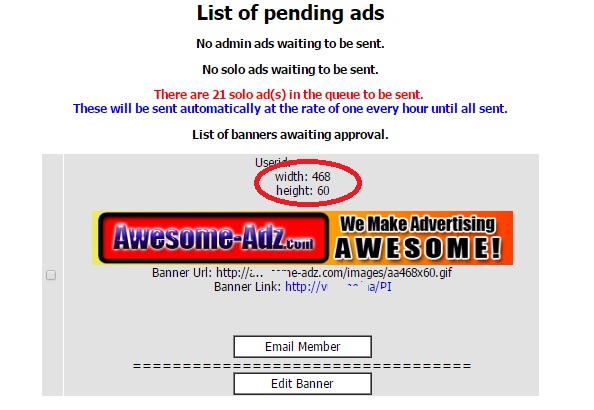
The major problem I have is with 600×300 Login Ads.  I have many serial abusers.  So, I installed some code that adds the width and height to the approval window.  That makes it  so much easier, but there are some sneaky graphic designers who put a small or non-existing graphic in Layer 0 (on a multi-layer or GIF Ad).  In that case it does not report the graphic dimensions.

The code I added was pretty simple.  The $variables are the result of the select statement and are pretty self explanatory.

<?
list($width, $height) = getimagesize($bannerurl);
echo “width: ” . $width . “<br />”;
echo “height: ” . $height;
?>

The workhorse in this code is getimagesize() which returns an array.

  • Element 0 is WIDTH
  • Element 1 is HEIGHT

There is so much more information about the graphic object, but these are the only two elements I care about here.

So, when I add this code, here’s what it looks like:

getimagesizeexample

I added several other reports:

  • View Login Ads By Userid – I prompt for the userid to select and display all Login ads submitted by that member.
  • View All Oversize Login Ads – I haven’t found a way to make this run any faster – with over 5000 login ads in my database, it takes awhile to determine the oversize ads and display them in an approval window.
  • Graphic Preview – I modified the Graphic Preview code to display the width and height.  At some point (when I figure out how to screen those Layer 0 ads that so not display the size), I will also put up blocker code that will keep them from submitting oversize ads.

I receive hundreds to thousands of ads per day, many of which originate from the blaster systems.  I have also put some additional reports that help me segregate the locally submitted ads from the blaster-originated ads.  Even though these ads are SUPPOSED to be approved at the originating site, I still get SO MANY that were just summarily approved just to clear the queue.

As always, please feel free to contact me with questions, if you want a demo, or are curious about other resources I can share with you.

My contact info:

Rich Moyer
WebcastSource .com
1-484-902-8819 m-f 8am-5pm EST
Email: richard.moyer.1953@gmail .com
I am a CONSULTANT FIRST and SALESMAN LAST.
Paying It Forward…
Listen to a recording about my MLM business
and how I get 3-5 leads per day.
Call 1-585-902-8819
(Callbacks to US only. Other countries leave email address)

Got Backup? Haven’t signed up for YOUR
Unlimited Cloud Storage? Get it NOW.
>>>>> http://www.WebcastSource.com/?rd=rg9jrZt9

TAE Admin Approval Queue Report

The TAE Admin Approval Queue Report shows a quick count of the number of each ad type awaiting approval.  “Blaster” solos are broken out to help me better manage the SENDSOLO queue.

 The Code to Enhance the TAE Admin Approval Queue Operations

Several areas of the APPROVEADS.PHP file must be modified.  First, the “reporting area” that appears at the top of the Approve Ads screen displays a count of solos in the send queue, that is, those that are approved but have not yet been sent.

WARNING: Before making modifications to any code, be sure you copy it and rename the copy so you can recognize it as the original.  If you make a mistake, simply deleting your changed file and renaming the original will restore it to a known working state.


The Reporting area

This is a simple replication of the code that is already there to approve solos, and then making some “where” clause delimiters that separate the “normal” solos from the solo ads that have “promotionmagnet” in the URL.  

The first query appends a condition to the where clause: and not url like ‘%promotionmagnet%’

 The second query appends a condition to the where clause: and  url like ‘%promotionmagnet%’

Other than some minor editing of labels that display on the screen with those counts.

// RJM changed this section to display only “normal” solo ads (ie. NOT Promotion Magnet) that have been approved and are in the send queue
$querysolos = “select * from solos where (sent=0 and added=1 and approved=1) and not url like ‘%promotionmagnet%'”;
$resultsolos = mysql_query ($querysolos)
or die (“Query failed”);
$numrowssolos = @ mysql_num_rows($resultsolos);
if ($numrowssolos == 0) {

echo “<p><center>No solo ads waiting to be sent.</center>”;

}
else {

?>
<p><font color=”red”><center>There are <? echo $numrowssolos; ?> Normal solo ad(s) in the queue to be sent. </font><br><font color=”blue”>These will be sent automatically at the rate of one every hour until all sent.</center></p></font>
<?

}
// RJM end of changed section

// RJM Added this section to separate the Promotional Magnet solos from “normal” solos that have been approved and are in the send queue

$querysolos = “select * from solos where (sent=0 and added=1 and approved=1) and url like ‘%promotionmagnet%'”;
$resultsolos = mysql_query ($querysolos)
or die (“Query failed”);
$numrowssolos = @ mysql_num_rows($resultsolos);
if ($numrowssolos == 0) {

echo “<p><center>No Promotion Magnet solo ads waiting to be sent.</center>”;

}
else {

?>
<p><font color=”red”><center>There are <? echo $numrowssolos; ?> Promotion Magnet solo ad(s) in the queue to be sent. </font><br><font color=”blue”>These will be sent automatically at the rate of one every hour until all sent.</center></p></font>
<?

}
// RJM end of new section


 The Approval Area

This is a bit more complex only because the sections of code are much longer.  You must be sure you include all of the code in each section.

 Using the Code Editor in CPANEL, I like to find an If… Else  section by clicking on the left bracket ( { ) immediately following the IF statement.  The CODE EDITOR will show you matched parentheses and brackets by highlighting then in orange.  Now look down through the code until you find the matching right bracket ( } ).  That should take you to the ELSE portion of that statement.  Use the same procedure to find the start and end brackets for the ELSE.  This should be the end of the code you need to replicate.  Simply start from the beginning of that code section to after that last right bracket, copy it to the clipboard, and paste it after the end of the  last section.

The first query appends a condition to the where clause: and not url like ‘%promotionmagnet%’

 The second query appends a condition to the where clause: and  url like ‘%promotionmagnet%’

There is some minor editing of labels that display on the screen with those ads to be removed for approval.

One other important thing: you must identify each code area with a different name to make the “inverse” button check the ads in that section only.  In the second section of code, I highlighted the changed document name.

// RJM changed to show only “normal” solo ads, excluding those from Promotion Magnet
$query3 = “select * from solos where approved=0 and added=1 and not url like ‘%promotionmagnet%’“;
$result3 = mysql_query ($query3)
or die (“Query failed”);
$numrows3 = @ mysql_num_rows($result3);
if ($numrows3 == 0) {
echo “<p><center>No Normal Solo ads awaiting approval.</center>”;
}
else {

echo “<p><center>List of Normal Solo ads awaiting approval.</p>”;
?>
<form action=”approvesolo.php” method=POST name=solo>
<table width=85% border=0 cellpadding=2 cellspacing=2>
<?
while ($line3 = mysql_fetch_array($result3)) {
$id = $line3[“id”];
$userid = $line3[“userid”];
$subject = $line3[“subject”];
$adbody = $line3[“adbody”];
$url = $line3[“url”];

?>
<tr>
<td bgcolor=”<? echo $basecolour; ?>”><input type=”checkbox” name=”id[]” value=”<? echo $id; ?>”></td> <td bgcolor=”<? echo $basecolour; ?>”><font size=2 face=”<? echo $fonttype; ?>” color=”<? echo $fontcolour; ?>”>
<center>Userid: <a href=”memberlogin.php?userid=<? echo $userid; ?>”><? echo $userid; ?></a></center>
<br>
<center>Date Submitted: <? echo date(“Y-m-d G:i”, $line3[“date”]); ?></font></center>
<br>
<center>Subject: <? echo $subject; ?></center>
<br>
<center><? echo $adbody; ?></center>
<br>
<center><a href=”sitecheck.php?url=<? echo $url; ?>” target=”_blank”><? echo $url; ?></a></font></center>
<br>
<center><table border=1 cellpadding=0 cellspacing=0 width=155 height=26><tr valign=middle><td align=”center” nowrap style=”background:white” onMouseDown=”this.style.backgroundColor=’#FFFFFF'” onMouseOver=”this.style.backgroundColor='<? echo $nav_hover; ?>'” onMouseOut=”this.style.backgroundColor=’#FFFFFF'”><a href=”email.php?Member=<? echo $userid; ?>” class=”button” target=”_blank” onmouseover=”window.status=’Email Member’;return true” onMouseOut=”window.status=”;return true”><font color=”#000000″>&nbsp;&nbsp;&nbsp;Email Member&nbsp;&nbsp;&nbsp;</font></a></td></tr></table></center>

<center>
<b>==================================<br>
<center><table border=1 cellpadding=0 cellspacing=0 width=155 height=26><tr valign=middle><td align=”center” nowrap style=”background:white” onMouseDown=”this.style.backgroundColor=’#FFFFFF'” onMouseOver=”this.style.backgroundColor='<? echo $nav_hover; ?>'” onMouseOut=”this.style.backgroundColor=’#FFFFFF'”><a href=”editsolo.php?id=<? echo $id; ?>” class=”button” target=”_blank” onmouseover=”window.status=’Edit Solo’;return true” onMouseOut=”window.status=”;return true”><font color=”#000000″>&nbsp;&nbsp;&nbsp;Edit Solo&nbsp;&nbsp;&nbsp;</font></a></td></tr></table></center>

</td>
<tr>
<td>&nbsp;</td>
</tr>

</tr> <?
}
echo ‘</table><input type=”button” onClick=”return Inverse(document.solo);” value=”Inverse”><input type=”submit” name=”submit” value=”Approve”><input type=”submit” name=”submit” value=”Delete”></form></center>’;

}

//RJM added this section to show Promotion Magnet Solo Ads only
$query3 = “select * from solos where approved=0 and added=1 and url like ‘%promotionmagnet%'”;
$result3 = mysql_query ($query3)
or die (“Query failed”);
$numrows3 = @ mysql_num_rows($result3);
if ($numrows3 == 0) {

echo “<p><center>No Promotion Magnet Solo ads awaiting approval.</center>”;
}
else {
echo “<p><center>List of Promotion Magnet Solo ads awaiting approval.</p>”;
?>
<form action=”approvesolo.php” method=POST name=pmsolo>
<table width=85% border=0 cellpadding=2 cellspacing=2>
<?
while ($line3 = mysql_fetch_array($result3)) {
$id = $line3[“id”];
$userid = $line3[“userid”];
$subject = $line3[“subject”];
$adbody = $line3[“adbody”];
$url = $line3[“url”];

?>
<tr>
<td bgcolor=”<? echo $basecolour; ?>”><input type=”checkbox” name=”id[]” value=”<? echo $id; ?>”></td> <td bgcolor=”<? echo $basecolour; ?>”><font size=2 face=”<? echo $fonttype; ?>” color=”<? echo $fontcolour; ?>”>
<center>Userid: <a href=”memberlogin.php?userid=<? echo $userid; ?>”><? echo $userid; ?></a></center>
<br>
<center>Date Submitted: <? echo date(“Y-m-d G:i”, $line3[“date”]); ?></font></center>
<br>
<center>Subject: <? echo $subject; ?></center>
<br>
<center><? echo $adbody; ?></center>
<br>
<center><a href=”sitecheck.php?url=<? echo $url; ?>” target=”_blank”><? echo $url; ?></a></font></center>
<br>
<center><table border=1 cellpadding=0 cellspacing=0 width=155 height=26><tr valign=middle><td align=”center” nowrap style=”background:white” onMouseDown=”this.style.backgroundColor=’#FFFFFF'” onMouseOver=”this.style.backgroundColor='<? echo $nav_hover; ?>'” onMouseOut=”this.style.backgroundColor=’#FFFFFF'”><a href=”email.php?Member=<? echo $userid; ?>” class=”button” target=”_blank” onmouseover=”window.status=’Email Member’;return true” onMouseOut=”window.status=”;return true”><font color=”#000000″>&nbsp;&nbsp;&nbsp;Email Member&nbsp;&nbsp;&nbsp;</font></a></td></tr></table></center>

<center>
<b>==================================<br>
<center><table border=1 cellpadding=0 cellspacing=0 width=155 height=26><tr valign=middle><td align=”center” nowrap style=”background:white” onMouseDown=”this.style.backgroundColor=’#FFFFFF'” onMouseOver=”this.style.backgroundColor='<? echo $nav_hover; ?>'” onMouseOut=”this.style.backgroundColor=’#FFFFFF'”><a href=”editsolo.php?id=<? echo $id; ?>” class=”button” target=”_blank” onmouseover=”window.status=’Edit Solo’;return true” onMouseOut=”window.status=”;return true”><font color=”#000000″>&nbsp;&nbsp;&nbsp;Edit Solo&nbsp;&nbsp;&nbsp;</font></a></td></tr></table></center>

</td>
<tr>
<td>&nbsp;</td>
</tr>

</tr> <?
}
echo ‘</table><input type=”button” onClick=”return Inverse(document.pmsolo);” value=”Inverse”><input type=”submit” name=”submit” value=”Approve”><input type=”submit” name=”submit” value=”Delete”></form></center>’;

}


Don’t forget to save the file, and TEST, TEST, TEST.

These few minor changes to the script help me better manage the monster influx of blaster adds, and allow me to give priority to ads submitted by local members, in addition to tons of time that it took to manually review that queue 10-15 times per day to be sure MY subscribers were getting the best service.


Rich Moyer

aka the ExcelVBA Wizard

WebcastSource.com

Tutorial: Promotion Magnet Awaiting Approval Report

I own several relatively small safelists: Giant Profit Ads and Mad Cow Ads.   Both of these are on the same server, so they share MYSQL engine, and cron.  When I signed up as a partner with several solo blaster networks, I found that my server seemed to be crawling.  It was taking forever to clear the SOLO Ad queues and in fact, it got totally out of control. I created the Promotion Magnet Awaiting Approval Report to help me manage my queue and give priority to Mad Cow Ads and Giant Profit Ads members in sending Solo ads.

The good folks at AFF looked into the problem, and identified that it was in fact the blaster programs that were feeding traffic in faster than the queue could send them out.  The way the Solo Send Queue works, is there is a command sendsolos.php placed in Linux scheduler called process “cron”, a system task that runs all the time in every Linux machine, and is used to execute a particular command either at a specific time or at a prescribed interval.   The items to be schedule are put into a “cron table” or “crontab” which is read by the cron process.   You can access cron for your server from CPANEL.  Only those items running in your partition of the Linux machine can be seen by you.

A temporary fix to this solo ad send queue backup was to change the crontab for sendsolos.php spedifying a shorter time interval and then monitor the server closely.   While this helped clear the logjam, it still took several days since the solo queue was well over 100.

The Fix

There were several things that we did that gave me more control.  For instance, the blaster programs (Promotion Magnet and Real Time Ad Blaster) both had options to either auto-approve, or manually approve.  The initial configuration was to have those blaster ad systems automatically approve the posts.  My thought was, they had to be approved by the admin on the system from which they originated, so then, when they were sent to my server, I would should not have to approve them again.   Again, my thought was, “why approve it twice?”

Manual Approve is Your Friend

By switching the blaster configurations to manual approval, it put control back in my hands for the ads originating from the blaster systems that were being added to the solo send queue.   It also created a heck of a lot of work for me to monitor and manually approve ads to maintain a reasonable queue depth so we don’t get emails rejected.

My New Approval Process

Promotion Magnet and Real Time Ad Blast systems are now set to manual approval.

I am getting tons of banners,  buttons, hot links, traffic links, and login ads, which takes some time to validate the image and/or text, validate the target URL, run framebreaker tests, and approve.  It is hard to distinguish which of these are coming from my own system or from the partner feeds, so I do go through with the manual approval process as stated above.

Solo ads are a different story.  When an blaster solo ad is sent from the blaster system, for tracking purposes, the target URL on the solo ad is cloaked with the root blaster system URL, which is fairly obvious to visually detect in the target URL field shown for solo ad approval.

I approve all locally generated solo ads first after running framebreaker.  Unless it is a massive rush, they get approved into the send queue right away.   In “Approve Ads” on the admin Nav menu, a number is displayed on that screen consisting of the count of approved ads in queue, waiting to send.  If that number is below 10, I then manually approve the blaster solo ads awaiting my approval until a send queue number not exceeding 10 is reached.

Good Night Gracey

I am a one-man shop, so I do have to sleep some amount of time.  Before I am getting ready to shut down my laptop for the night, I approve up to 50 blaster solo ads to fill the queue until I come back on admin duty.

This has worked out very nicely so far.  My Solo ads originating from members on my own systems are being given priority, the queues are not overloaded, and the crontab entries for sendsolos.php are back to the “normal” setting of once every hour, and there is no detrimental effects I have found.

What is missing?

I found that it would be helpful to know how many blaster solo ads are awaiting approval.  There was no report or facility in the software to accommodate this query.  Being familiar with the database structure and tables in the MySQL database, I was also comfortable enough to do some non-invasive queries using phpMyAdmin (available on CPANEL).  Once I formulated the SQL query, it was simple enough to create a php script that displays the date/time, system being queried, and count of solo ads from that blaster system awaiting approval.   The php script is run from the address bar in my  browser.  This is not fancy, and simply clears the screen to display this little report.  I call it the Promotion Magnet Awaiting Approval Report.

Multiple Systems in the Same Script

Because I have two safelists on the same server that share an MySQL database instance, it was easy to create the query code to allow multiple iterations of the report for each unique safelist.   I simply create a function in the PHP script that is called multiple times  from the mainline of the program, each call with the specific parameters required by each system database.

The Program: promotionmagnet-solos-in-queue.php

[code language=”php”]

<?php

// Copyright (c) 2015 Spaho Consulting

// Promotion Magnet Awaiting Approval Report
// Display the solo queue count for promotionmagnet
// for System1 and System2

//===========================================================
//Mainline Routine
//===========================================================

// Constants – change for each site
$ROOTUSERID = “your-root-userid”;
$ROOTPSWD = “your-root-password”;

// System1
$DBNAME = “system1db”;
$SAFELIST = “system1name “;
SoloQueueReport($DBNAME, $SAFELIST, $ROOTUSERID, $ROOTPSWD); // execute the report

// then System2
$DBNAME = “system2db”;
$SAFELIST = “system2name “;
SoloQueueReport($DBNAME, $SAFELIST, $ROOTUSERID, $ROOTPSWD); // execute the report

// end of mailine
//=============================================================

function SoloQueueReport($DBNAME, $SAFELIST, $ROOTUSERID, $ROOTPSWD)

{

// setup the log
$logfilename = “promotionmagnet-queue-count.log”;  //must exist before executing this report

// send output to log file
$handle = fopen (“$logfilename” , ‘a+’);
$date = new DateTime();
echo $SAFELIST . $date->format(‘Y-m-d H:i:s’) .”<br>”;
fwrite ($handle, $SAFELIST . ” ” . $date->format(‘Y-m-d H:i:s’) . “\n”);

// set up the database connection
$MYSQLI = new mysqli(“localhost”, “$ROOTUSERID”, “$ROOTPSWD”, “$DBNAME”,”3306″);

if ($MYSQLI->connect_errno) {
echo “Failed to connect to MySQL: ” . $MYSQLI->connect_errno . $MYSQLI->connect_error . “<br>”;
fwrite ($handle, “Failed to connect to MySQL: ” . $MYSQLI->connect_errno . $MYSQLI->connect_error . “\n”);
}
$result = null;

// see if there are any solos in queue
if ($result = $MYSQLI->query(“SELECT subject FROM solos where approved=0 and sent=0 and url like \”%promotionmagnet%\””))
{
printf(“Approval Queue = %d <br><br>”, $result->num_rows);
fwrite ($handle, “Approval Queue = ” . $result->num_rows . “\n\n”);
$result->close();
} else {
echo “No Promotion Magnet Solos in Queue <br><br>”;
fwrite ($handle, “No Promotion Magnet Solos in Queue \n\n”);
}
$MYSQLI->close();
fclose($handle);
}
?>

[/code]


Explanation of the Code

Mainline Code

This is the main program, Promotion Magnet Awaiting Approval Report, that sets up the parameters for querying the database for each system then calls the function  SoloQueueReport().

Constants

[code language=”php”]

// Constants – change for each site
$ROOTUSERID = “your-root-userid”;
$ROOTPSWD = “your-root-password”;

[/code]

Since both systems are co-located in separate subdomains of the same server, they share a common MYSQL database engine, but each have their own database that MYSQL installation.  Both would use the same Root UserID and Root Password to access those databases.


Set Up the Parameters

Each system has a separate database containing all of the tables needed to run that system.  We need to tell the database name through the variable $DBNAME, and the name of the system, which is used only in reporting but does not effect access to the database.

Once the Constants are set up, and the Unique Parameters are defined, we simply call the function, passing the variables containing those parameters to that function.

[code language=”php”]

// System1
$DBNAME = “system1db”;
$SAFELIST = “system1name “;
SoloQueueReport($DBNAME, $SAFELIST, $ROOTUSERID, $ROOTPSWD); // execute the report

[/code]

Inside the Function SoloQueueReport()

Set Up the Log File

[code language=”php”]

// setup the log
$logfilename = “promotionmagnet-queue-count.log”;

// send output to log file
$handle = fopen (“$logfilename” , ‘a+’);
$date = new DateTime();
echo $SAFELIST . $date->format(‘Y-m-d H:i:s’) .”<br>”;
fwrite ($handle, $SAFELIST . ” ” . $date->format(‘Y-m-d H:i:s’) . “\n”);

[/code]

This section defines the logfile name, then opens the file in APPEND mode

The  echo  writes the date to the screen, while the fwrite writes the date to the file.

Connect to the Database

[code language=”php”]

// set up the database connection
$MYSQLI = new mysqli(“localhost”, “$ROOTUSERID”, “$ROOTPSWD”, “$DBNAME”,”3306″);

if ($MYSQLI->connect_errno) {
echo “Failed to connect to MySQL: ” . $MYSQLI->connect_errno . $MYSQLI->connect_error . “<br>”;
fwrite ($handle, “Failed to connect to MySQL: ” . $MYSQLI->connect_errno . $MYSQLI->connect_error . “\n”);
}
$result = null;

[/code]

In order to do anything with a database, you must create a logical connection from the process to that database.  This also detects a failure and ends the procedure.

Build the SQL Query and Retrieve the Data

We are using a SELECT statement for the query.  The syntax is SELECT field FROM tablename WHERE field1 (comparative operator) value…

We are combining functions here: executing the query and performing an If Then Else test to ensure the result was returned.  If successful, then extract the number of rows returned by the query, and print the report both to the screen and the logfile.

If the query was not successful, or if the result was negative because there were no records retrieved that matched our criteria, then write an error message to both the screen and logfile.

[code language=”php”]

// see if there are any solos in queue
if ($result = $MYSQLI->query(“SELECT subject FROM solos where approved=0 and sent=0 and url like \”%promotionmagnet%\””))
{
printf(“Approval Queue = %d <br><br>”, $result->num_rows);
fwrite ($handle, “Approval Queue = ” . $result->num_rows . “\n\n”);
$result->close();
} else {
echo “No Promotion Magnet Solos in Queue <br><br>”;
fwrite ($handle, “No Promotion Magnet Solos in Queue \n\n”);
}

[/code]

The Finished Report

So that is it.  Here is what is shown on the screen.

[code language=”text”]

MadCowAds 2015-01-28 22:44:19
Approval Queue = 1

GiantProfitAds 2015-01-28 22:44:19
Approval Queue = 33

[/code]

Please feel free to create your own version of Promotion Magnet Awaiting Approval Report.  Be sure to adjust the database parameters and ensure your SQL table names are correct.

Rich Moyer AKA The Excel VBA Wizard is Principal Consultant (retired) of Spaho Consulting who brings you Life Balance Network , GiantProfitAds, Mad-Cow-Ads, Global Connections Ads, Empire Text Ads, and is a Senior Monitor for the WorldProfit Live Business Center and Platinum VIP member of WorldProfit, WebcastSource.com
Check Each of Your Safelists

Just in case you haven’t done much “maintenance” on your ads and features available to you on your safelists, like GiantProfitAds and Mad-Cow-Ads, here are some things you want to check.  It is a good practice to check each of your safelists once every three months at least.

1 Protect Your Links.

Most of our members are not taking advantage of this Viral Traffic secret, which is available free to all members:

  • Pro is allowed 50 links,
  • JV is allocated 100 links, and
  • SuperJV members get 250 links as part of your membership.

You WANT to use this! Why? It puts your REFERRAL ID out there in the ad bar of every one of your ads that comes up in the rotation. If someone clicks that link and joins, you get the REFERRAL CREDIT, and so much more (including CASH if your referral upgrades or purchases ads).
My Bad: I hadn’t checked Protect Your Links on my own accounts for awhile, and I found that I had some bad URL’s, or projects in which I was no longer participating.

2. Check Banners, Buttons

Be sure the banner displays properly. Click the banner to test the URL. For those expired buttons or banners, you can purchase (or trade credits for) blocks of 1000 views, and then apply it to an existing banner.

3. Hot Links, and Traffic Links.

Click the link to test the URL. For those expired links, you can purchase (or trade credits for) blocks of views, and then apply it to an existing link.

4. Downline Builder

There are two important things here: You get to define 3 of YOUR websites, and you get the opportunity to fill in YOUR REFERRAL ID for that site after you join. New sites are being added all the time, so you should check back, and update the Downline Builder so YOUR REFERRALS can join using YOUR REFERRAL LINK.

5. Review your advertising strategy.

a). Your objective on safelists and traffic exchanges should be to BUILD YOUR LIST not to “sell stuff”. Once they are on your list, then you periodically make offers, but NURTURE your list, provide them with INFORMATION and VALUE and don’t beat them to death with promotion after promotion.
b). Banner Ads ARE AN EFFECTIVE MEDIUM!
c). This is a SURF SITE in addition to a Safelist. You can define YOUR surf ads and get great point rewards for reviewing Surf Sites posted by other members.
d). Admin Ads are rewarded with high point values!
e). Promote the One Time Offers and Login Offers to your downline, and externally. Why?

  • You get rewards for getting referrals to sign up here,
  • points EVERY TIME THEY LOG IN,
  • points for every ad they surf or click, and
  • COMMISSIONS for every purchase made by your downline.
    You can send to your downline ONCE A WEEK
  • Use your SPLASH PAGES on safelists and text exchanges – they load faster. You have THREE SECONDS before the average surfer gets distracted. Using a slow-loading page may lose the opportunity.

f). Encourage your downlines to:

  • Log in DAILY (you get points)
  • Click the Daily Bonus and Login Bonus
  • SURF (you get points)
  • READ ADS FOR CREDIT (you get points)
  • POST ADS HERE (you get points when they trade points for ads)
  • Purchase Ads Here (you get COMMISSIONS from the sale)
  • PURCHASE NETWORK ADS ($$)

WHY? This gets YOU credits for any credits earned by your downline, and COMMISSIONS from upgrades and the sale of ads purchased by your downline!

g). For every 10 ads you place for other projects on this and other safelists an traffic exchanges, you should be promoting GiantProfitAds so you can BUILD YOUR DOWNLINE THROUGH REFERRALS.

  • You are rewarded HANDSOMELY for referrals that upgrade to be paid members.
  • It is an opportunity to build your list
  • It is an opportunity to earn CASH for any upgrades or ad purchases by your referrals

Referrals mean new eyes on your ads, more opportunities for referrals in Downline Builder.

In Tools and Stats, there are graphic assets such as banners, buttons, login ads. There you will also find email swipes.
As always, if you need help, or have questions, fill out a support ticket.

All About Traffic Exchanges

If you are unsure about the differences between Safelists (also called Text Ad Exchanges or TAE) and Traffic Exchanges (TE), there are two free eBooks that tell about each type.

Master of Text Ad Exchanges

This free eBook will tell you all about a Text Ad Exchange.  TAE’s At the Top of My List:
Giant Profit Ads
Mad-Cow-Ads
Global Connections Ads 

Empire Text Ads 

All About Traffic Exchanges

This free ebook tells in detail about TE’s.  Sponsored by:
Traffic-Splash
TE-Command Post
Tezak Traffic Power
Traffic Swirl
Hit 2 Hit

Rankings

There are some very important websites to join (for free) an use as a reference for both TAE and TE systems.  The Hoopla family of sites provides RANKINGS, as determined by their extensive testing, on a weekly basis.  If you are going to join any safelist or traffic exchange, check these sites for the highest ranked sites. 

TE Hoopla – for Traffic Exchange Rankings
List Hoopla
Traffic Hoolpa – The best traffic rankings
Profit Hoopla – The highest profit sites

Get Free Referrals

Don’t forget to join the sites in the Downline Builders (also called Referral Builders).  Whenever you join a new TAE or TE, save the AFFILIATE LINKS in a Notepad or Excel file.  For every site you join, reference this list, and if you are already a member of sites on the Downline Builder list, then update that listing with YOUR affiliate ID or referral ID.
Your Referral Link can be found generally on the Tools and Stats, Affiliate, Resources, etc. section of the site you just joined. 

Everyone who joins UNDER YOU (meaning YOUR referrals) is presented with this list POPULATED WITH YOUR REFERRAL LINK INFORMATION.  So, if they JOIN any of the programs in which you are an affiliate, they become YOUR REFERRAL in THAT program too!  In many programs, you are rewarded (points, cash or other reward) and can collect commissions if your referrals upgrade or make purchases (of traffic packs, etc).  THIS IS PURE AND SIMPLE RESIDUAL or PASSIVE INCOME!

IMPORTANT:
When asked for a REFERRAL LINK, copy and paste the complete URL of your Referral Link, including http://
For example, I would enter the full URL if my REFERRAL LINK for Mad-Cow-Ads is
     http://mad-cow-ads.com/index.php?referid=richardmoyer

When asked for a REFERRAL ID, you put only the ID portion of the Referral Link
* For the same REFERRAL LINK, if asked for the REFERRAL ID, I would enter only the highlighted portion
     http://mad-cow-ads.com/index.php?referid=richardmoyer

Reseller Fees and License

If there is a RESELLER FEE or AFFILIATE FEE for any particular program that grants you permission and license to market that product, only join IF YOU INTEND TO ACTIVELY MARKET THAT PROGRAM.  You always have the option to join the affiliate program later.